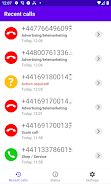
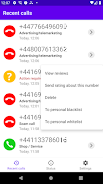
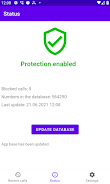
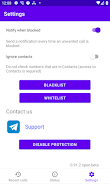
Fed up with unknown numbers interrupting an important call or a quiet lunch break? Call Filter offers a focused way to stop unwanted incoming calls without a lot of setup or invasive permissions. The app runs quietly in the background, relies on a regularly refreshed blocklist, and gives you control over which categories of calls are screened. This introduction outlines what the app does, how it protects your privacy, and what to expect when you install it.
Simple privacy-first design: The app blocks nuisance calls without requesting access to your contacts, so your address book stays private.
Updated blocklist: A central database of suspicious and spam numbers is refreshed frequently so new scam patterns are added automatically.
Battery- and data-aware: Updates are scheduled based on battery level and connection type to avoid unnecessary drain or data usage.
Multiple block categories: Built-in rules cover advertising calls, debt collectors, survey lines and other intrusive services to reduce interruptions.
Automatic detection: Incoming calls that match known spam or scam signatures are filtered out before they ring loudly.
Personal blacklist with wildcards: You can add individual numbers or use wildcard patterns to block ranges or partial matches for persistent callers.
Optional non-contact blocking: An opt-in setting lets you block all calls that aren’t in your phonebook, helpful when you want only known callers to get through.
No ads or data harvesting: The tool is offered free and focuses on call blocking without collecting or transferring your contacts or personal data.
Install and grant call permissions: After installation, enable the app’s call-screening permission so it can identify and block disruptive numbers.
Pick your protection level: Choose broad blocking for maximum quiet or a lighter profile that only stops the most aggressive spam calls.
Manage the blacklist: Add troublesome numbers or patterns to your personal list and remove entries when you need to restore access.
Let updates run automatically: The app adjusts refresh frequency by itself, but you can check the last sync time if you want reassurance.
Does Call Filter need access to my contacts?
No. The app does not require your address book and can operate without reading or uploading contact information.
How often is the blocklist updated?
The central database is refreshed several times a day; the app chooses appropriate intervals based on battery state and network connection.
Can I whitelist or allow certain numbers?
Yes. You can exempt numbers in your contacts and manage a personal allow list to ensure important calls are never blocked.
Will Call Filter affect battery life or data usage?
The app is designed to minimize impact by scheduling updates intelligently, so normal battery and data use should be largely unchanged.
Compared with carrier call-blocking or large security suites, Call Filter concentrates on fast, unobtrusive screening with minimal permissions, making it a good match for people who want quiet phones and tighter privacy controls. It won’t replace specialized enterprise tools, but for everyday users and professionals who need reliable call filtering with little fuss, it’s a practical choice that balances convenience and discretion.