
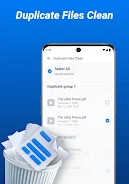
Neo Clean is a compact storage and maintenance utility for Android designed to help you reclaim space, remove temporary clutter, and keep your device running smoothly. Neo Clean launches fast, presents a clear overview of junk categories, and gives you control over what to remove so cleanup remains safe and deliberate. The app targets cached files, leftover APK installers, ad and log files, and other temporary items while also surfacing large or duplicate files and screenshots that may be taking up valuable storage.
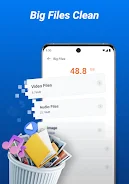
Neo Clean’s core cleaning tool scans common locations for temporary and residual files and groups results into understandable categories so you can review before deleting. The big-file scanner highlights items above a configurable threshold (default seen as files larger than 10MB) to help you identify videos, archives, or installer packages that consume space. Duplicate detection compares file size and content signatures to present likely duplicates for removal without guessing. A dedicated screenshot scan lists images produced by the system so you can clear visual clutter created by repeated captures. Basic battery details are included to show current charge level and recent usage patterns; this information is presented as a quick reference and does not replace a full battery-monitoring app.
The app performs read-only scans until you choose to remove items, giving you a preview of each cleanup action. Scanning is organized by category so you can focus on caches, APK leftovers, ad/log files, large items, duplicates, or screenshots independently. When duplicates or large files are detected, Neo Clean provides contextual file information such as path, size, and last modified date to help you decide which copies to delete. Deletions are immediate and permanent on the device, so Neo Clean prompts for confirmation and highlights that removed items cannot be recovered by the app.
Neo Clean offers a simple, touch-driven interface with one-tap scans and clear manual selection controls. Results are presented in a list with checkboxes and sorting options so you can filter by size, date, or file type before confirming deletion. The layout emphasizes readability with concise labels and large tap targets to make cleanup actions straightforward even on smaller screens. Neo Clean also includes contextual help throughout the interface to explain permission requests and common scan categories for users who prefer step-by-step guidance.
While Neo Clean is not a game, it includes elements that make regular use helpful: repeated scans show how reclaimed space changes over time and help you maintain a tidy device. You can customize which categories the app inspects during a scan, adjust the file-size threshold used for the big-file view, and save preferred sorting choices to speed up future cleanups. These small customization options make Neo Clean a practical tool to revisit regularly, especially after installing many apps, downloading media, or taking frequent screenshots.
The visual design focuses on clarity and low distraction: neutral colors, clear typography, and a simple icon set keep attention on actionable items rather than flashy visuals. Neo Clean supports larger text sizes and follows common Android accessibility patterns so screen readers and magnification tools behave predictably. Buttons and lists use adequate spacing for easier tapping, and contrast ratios are chosen to be legible in both bright and dim viewing conditions.
Neo Clean operates entirely on the device; all scans and deletions are performed locally without requiring network access. The app requests only the file and storage permissions necessary to scan and remove content and explains each permission within the interface so you can make informed choices. Because Neo Clean does not upload file listings or content to external servers, it is suitable for users who prefer to keep cleanup activity private and contained to the device.
Neo Clean frees storage by identifying and removing common temporary files, unused installer packages, and redundant media. The focused toolset makes it quick to find the largest space hogs and duplicates without wading through system settings or multiple apps. Its preview-first approach and manual selection controls ensure you decide what stays and what goes, reducing accidental deletions.
The app requires permission to access storage and files in order to perform thorough scans, and users must grant these permissions to use the cleaning features. Neo Clean performs permanent deletions and does not include a recovery feature, so items removed by the app cannot be restored through Neo Clean once deleted.