


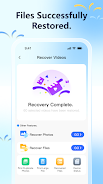
DeepRestore is a privacy-focused recovery tool that helps you scan Android devices for deleted photos, videos and documents while keeping all processing on the device. DeepRestore starts with a simple permission request and guides you through an on-device scan that does not upload any content to the cloud, making it suitable for users who prioritize local control over their files. The interface is built to be approachable for casual users while providing enough detail for more technical users who want to understand recoverability and storage behavior.
The app supports multi-type recovery so you can look for images, video files and common document formats in a single workflow. Previews are available where possible so you can inspect items before deciding to restore them, and filters let you narrow results by file type, approximate date range and size. Scans show progress and an estimated recoverability indicator that explains why an item may be partially damaged or unrecoverable. All scanning, previewing and file reconstruction routines run locally on the device to protect your privacy and avoid external data transfer.
DeepRestore performs a staged scan that begins with a quick pass to locate recently deleted file entries and then optionally performs deeper sector-level examination if you choose a more thorough search. The app requests the minimum permissions needed to access storage and explains each step in plain language. Results are grouped by file type and displayed with contextual metadata such as filename hints, file size and a time estimate of the original modification. When you select an item to restore, DeepRestore writes recovered files to a user-selected folder so you remain in control of file placement.
The interface uses simple tap and long-press gestures for primary actions: tap to preview, long-press to select multiple items, and on-screen toggles to switch scan depth or include external SD storage if present. Progress bars and status messages keep you informed during scans, and undo-friendly controls let you cancel a scan or clear results safely. Visual layout follows a clean, familiar material-design style with readable labels, high-contrast icons and scalable text so navigation is straightforward on phones and tablets alike.
Rather than traditional game-style progression, DeepRestore offers practical progression through scan depth and configuration: quick scans are faster and useful for recent deletions, while deeper scans take longer but can find older or fragmented data. You can customize scanning presets to favor speed or thoroughness, set a storage location for restored files, and save filter sets for repeat searches. Because storage activity affects recoverability, repeating scans after powering the device off or before installing new apps can improve chances of finding salvageable items, which gives the app practical replay value for real-world recovery tasks.
DeepRestore is designed to work fully offline and does not require an internet connection to scan or restore files, which is important for sensitive content and mobile usage without connectivity. Accessibility considerations include large touch targets, adjustable font sizes and clear status descriptions for screen readers. Performance scales to device hardware: the app adapts memory use to avoid interfering with other apps and surfaces guidance if a deep scan is likely to run for an extended period on older devices.
Successful recovery depends on whether deleted data has been overwritten by new files; DeepRestore cannot guarantee restoration of every item. The app provides honest guidance about success likelihood and suggests practical steps to improve chances, such as stopping heavy file writes and running a deeper scan sooner rather than later. It is not a cloud backup replacement, so maintaining separate backups remains recommended for critical content. These limitations are clearly explained in-app to set realistic expectations before you begin a recovery attempt.