

SONIC: Discover New Music is a minimalist discovery app that helps you find and preview new tracks quickly and editorially. Built around fast listening sessions, the app focuses on short previews, clear typography, and gesture-first navigation so you can explore many songs without committing to full playback. Curated Explore decks highlight new releases and editor-selected tracks, Favorites lets you collect and organize the songs you want to revisit, and a simple sign-in option keeps likes in sync across devices. The interface favors high contrast and legible type to make scanning stacks of songs comfortable on both phones and tablets.
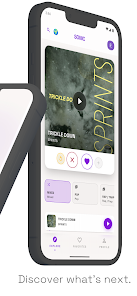
Discovery in the app is driven by a deck-based browsing model: swipe to move between curated selections, tap to hear a short preview, and use simple gestures to save or skip a track. Previews are intentionally brief so you can sample many artists in a short session, which makes it easy to build a habit of daily exploration. Editorial collections are grouped by theme, release date, or mood to give you structured paths through new material, and the Explore view surfaces fresh additions alongside staff picks for focused listening.
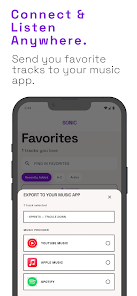
SONIC: Discover New Music hands off full playback to the music apps you already use so your main library and playlists remain where you prefer. When a preview piques your interest, an in-app action opens the track in your chosen player for complete streaming or offline listening according to that app's capabilities. This separation keeps discovery lightweight while preserving compatibility with popular music services. Note that the app only provides short previews for quick taste checks, and full tracks require opening them in another app where supported.
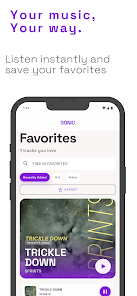
Across Explore and Favorites, SONIC: Discover New Music helps you shape a personal library without forcing complex setup. Tap to save favorites and create simple folders or tags to organize them your way, or rely on chronological and editorial collections to keep new finds visible. As you save tracks, the selections you see will reflect your interests through curated follow-ups and themed releases, making the app feel progressively more tuned to your taste while keeping editorial context visible for discovery.
The app uses a bold, typography-forward aesthetic with high-contrast elements to support quick scanning and reduce eye strain during extended sessions. Large touch targets and clear labels make navigation accessible for a wide range of users, and the interface design pairs well with system accessibility settings such as larger text sizes and screen readers. The streamlined layout reduces clutter so people relying on assistive technologies can move through previews and collections efficiently.
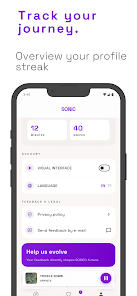
Controls are deliberately simple: swipe through cards to browse, single-tap to play a preview, and use visible action buttons to favorite or open a track in another player. Explore, Releases, and Favorites are the main sections, each focused on a different stage of the discovery flow: browse editorial picks, check recent releases, and manage saved songs. Signing in is optional but recommended if you want tastes synced across multiple devices. Previews are short by design, which keeps data use modest during sessions and speeds up browsing when network conditions are variable.
SONIC focuses on discovery rather than full playback. That means you should expect to hear short previews rather than complete tracks, and you may see ads in supported regions. Full listening requires opening tracks in a compatible music app, and syncing likes across devices requires creating an account. These trade-offs let the app remain lightweight and editorially focused while integrating with the services that handle long-form playback and offline music storage.
Install the app, open Explore, and begin swiping—no setup is required to start sampling tracks. If you want your favorites synced, sign in and follow the prompts to connect with system-level music handlers when prompted to open full tracks in your preferred player. Use Favorites to build collections, try different editorial decks to vary what you discover, and rely on the clear, contrast-forward UI for fast, repeatable listening sessions that fit short breaks or commute time.