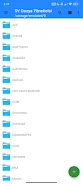

SV File Manager is a powerful, easy-to-use file manager for Android that helps you browse, organize and secure everything on your device. It brings a clean Material Design interface and fast performance, letting you create, move, rename, share or delete files and folders with instant search and flexible sorting. Built-in tools cover media playback, document and PDF viewing, ZIP archiving, APK handling and AES-256 file encryption, so it's useful for casual users who want a tidy phone and power users who need advanced tools. The app is lightweight and ad-free, making everyday file tasks quicker and safer.
⭐ SV File Manager lets you browse internal storage, create, rename, move, share and delete files with instant search and list or card views.
⭐ Safe Trash stores deleted files in a recoverable bin so you can restore them or permanently remove them when needed.
⭐ Built-in music and video players (MP4, MKV, WebM) include metadata support, background playback and swipe gestures for seeking.
⭐ Image viewer supports high-quality display, pinch-to-zoom and one-tap set-as-wallpaper for home or lock screen.
⭐ PDF and text tools let you view PDFs in-app, convert PDF pages to PNG and edit TXT/MD files with word and character counters.
⭐ ZIP archiving and APK manager enable compressing/extracting archives, installing APKs and backing up installed apps.
✅ SV File Manager is lightweight, ad-free and designed for smooth performance on most devices.
✅ Strong AES-256 encryption protects private files so only your password can decrypt them.
✅ Clean Material Design with theme options, color choices and swappable folder icon packs for personalization.
✅ Multi-language support across 13 languages and integrated media/document tools reduce the need for extra apps.
✅ Instant search, progress indicators and reliable archiving make common file tasks faster and more transparent.
❎ Advanced features like encryption and APK management may present a learning curve for casual users.
❎ If you forget the encryption password, encrypted files cannot be recovered because only the password can decrypt them.