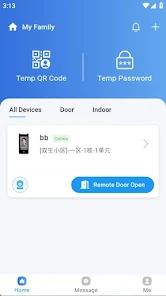
CommLink is a cross-border smart community management tool designed to simplify device control and resident interactions within managed properties. CommLink centralizes account registration and secure login for administrators and residents, supports verification code flows, delivers real-time call notifications, and enables device binding by QR scan and other secure pairing methods. The app focuses on reliable on-site workflows: property teams can monitor devices and calls, manage personnel and owner records, and use encrypted facial recognition where permitted to streamline access while preserving audit trails and privacy controls.
The core feature set covers account and permission management, message and call routing, device lifecycle tasks, and access control. Administrators can register users via email or phone and assign role-based permissions that determine what each person can view and control. Verification code services protect sensitive actions such as new registrations and password resets. Call message push provides clear notifications from devices to phones and vice versa, so on-duty staff receive timely prompts and reminders. Device binding is handled by QR scanning or code entry, with camera permission requested only for that purpose; once paired, devices report status and events back to the management console for monitoring and response.
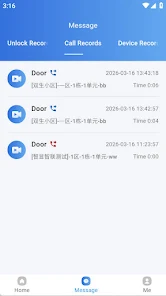
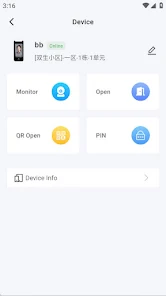
Workflows in CommLink are organized around common community scenarios: visitor calls at a gate or door, service personnel requests, or routine device checks. When a resident or visitor interacts with an access device, the system creates a call event that appears as a pop-up or reminder on registered staff devices. Staff can view device status and historical records before accepting or escalating a call. Device management screens show connectivity, recent activity, and basic troubleshooting steps. The app also records events related to access and facial recognition attempts in encrypted form for accountability, enabling administrators to review logs without exposing biometrics in plain text.
CommLink supports clear role separation so responsibilities can be delegated and scaled: property administrators maintain system-wide settings and device binding rights, security staff monitor live calls and respond to alerts, and residents have limited controls tied to their own units. Permissions form a progression system that reflects operational needs—new staff begin with restricted access and can be granted broader rights as they demonstrate competence. Audit trails and role change histories make it straightforward to track who made changes and why, which is important for compliance and incident review.
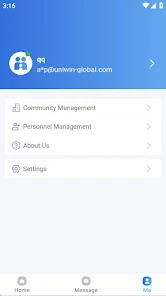
The app prioritizes a functional, easy-to-scan interface that places critical information and controls within reach. Touch controls, large call buttons, and clear status indicators reduce cognitive load for on-shift personnel. Administrative screens are arranged hierarchically so device lists, owner records, and call logs are accessible without deep navigation. Visual design emphasizes legibility and contrast for use in varied lighting conditions and supports basic accessibility considerations such as scalable text and straightforward interaction patterns. Camera access is requested only where necessary for device binding and can be revoked through standard device settings.
Property teams can tailor notifications and permission sets to match local operating procedures, and message templates can be customized for common call types. The app integrates with community access hardware that supports standard communication protocols; because it is optimized for managed environments, it is not intended as a general consumer utility. CommLink is built to handle intermittent network conditions gracefully: it queues urgent notifications and synchronizes records when connectivity is restored so that operational continuity is preserved during short outages.
Security is a central concern: communications and stored records are protected with encryption and access controls. Facial recognition, where used, stores biometric-derived templates in encrypted form and requires explicit consent and local policy configurations before activation. Administrators should follow local data protection regulations when enabling these features and provide clear consent flows to residents. Because the solution relies on compatible community devices, planning for device compatibility and on-site testing is recommended during deployment. Regular updates and clear privacy settings help maintain trust and ensure that the system continues to meet operational and regulatory expectations.
In everyday operations CommLink helps teams reduce administrative overhead by consolidating device control, message and record management, and permission tracking in a single interface. The combination of real-time notifications, activity logs, and role-based controls supports faster incident response and more reliable audits. Over time, adjustments to permission structures and notification rules allow properties to refine their processes, increasing the app’s practical value as an operational tool for community and property managers.