


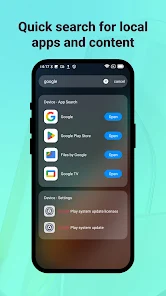

OKSearch Center is a lightweight, efficient search hub for Android that organizes local files, apps, and web queries into one fast interface. It delivers advanced filtering, customizable shortcuts, and clear result previews so users can find documents, contacts, or web content quickly without juggling multiple apps or confusing menus.
OKSearch Center merges local indexing with online query tools to provide a single point of access for everything on your device and the web. Results are ranked by relevance and context, so recent files, frequently used apps, and bookmarked web pages appear where you expect them. The app also supports quick actions such as opening, sharing, or copying items directly from the results list.
The interface focuses on speed and clarity. A compact search bar sits at the top, with filters and suggestions appearing as you type. Results are grouped by category, and context menus allow immediate actions such as share, delete, or open with a specific app. Customizable themes and compact layout options make it easy to adapt the view to larger phones or smaller screens.
OKSearch Center is optimized for low memory impact and minimal CPU usage. Background indexing happens during idle moments and respects power-saving modes to avoid affecting battery life. The app supports a wide range of Android versions and devices, and it scales gracefully across different resolutions. Network queries use caching to reduce repeated data transfers and speed up common searches.
Privacy is treated as a priority: local indexing remains on-device by default and only shares content with cloud services when the user enables integrations. Fine-grained permissions allow you to exclude specific apps or folders from indexing. Search history can be cleared manually or set to auto-delete on a schedule. For enterprise use, administrative settings let IT teams enforce policies and control which sources are searchable.
The app lets users tailor behavior to personal workflows. Create custom search profiles for work or personal use, set preferred search engines for web results, and choose which file types receive priority in indexing. Shortcut panels can be configured to open favorite apps, run a multi-criteria query, or trigger a voice command sequence — all customizable from the settings menu.
Download OKSearch Center and walk through a short setup that requests permission to index selectable folders and apps. The initial index is typically quick on modern devices; once complete, you’ll notice faster, more accurate search results. Explore the tutorial to set up shortcuts, voice commands, and cloud integrations to match your daily routine.
Anyone who juggles many files, apps, and online resources will find value in OKSearch Center. It’s particularly useful for professionals managing documents, students organizing notes, and power users who want rapid access to frequently used content without switching apps. The combination of speed, customization, and privacy controls makes it a practical tool for everyday productivity.