
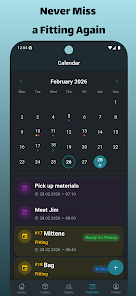
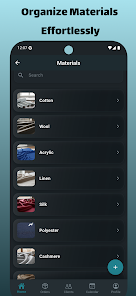
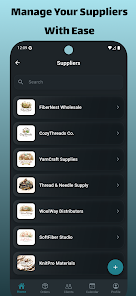
Sew Assistant is a mobile app that helps sewers plan projects, manage patterns, and track supplies. It provides measurement tools, step-by-step guides, and an organized fabric inventory to streamline every sewing task. Designed for home sewers and small businesses, Sew Assistant centralizes project notes and pattern adjustments.
Sew Assistant bundles practical tools into a compact interface focused on everyday sewing workflows. Core features include a digital pattern library, a fabric and notions inventory, an adjustable measurement chart, and a project timeline. Users can attach photos, set reminders for deadlines, and export or share project sheets with collaborators or clients.
The app connects measurement data with pattern details so you can keep size changes and alterations tied to a specific project. When you create a new project, Sew Assistant prompts you to enter body measurements, select patterns, and list required materials. Linked checklists update in real time as you mark tasks complete, ensuring cutting, basting, and finishing steps remain visible from start to finish.
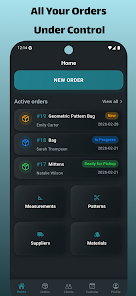
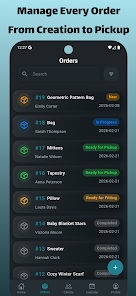
The interface uses clear icons and a minimal palette to keep attention on the project content. The home screen surfaces active projects and upcoming reminders, while a bottom navigation bar takes you to Inventory, Patterns, Projects, and Settings. Each project page has sections for notes, measurements, and a timeline with tappable actions so you can jump to pattern editing, shopping lists or measurement adjustments without digging through menus.
Sew Assistant supports custom pattern entries and common commercial pattern formats. You can tag patterns by style, difficulty, and fabric type for easy searching. The app also lets you create variation records so different size blocks or style hacks are preserved per project. This keeps a complete history of alterations, which is especially helpful for tailoring repeat garments or running a small alteration business.
A built-in inventory tracks yardage, trims, threads, and other supplies. Add items manually or scan barcodes where available; Sew Assistant will deduct quantities as you allocate materials to projects. Shopping lists are generated automatically when required materials are missing, and you can export lists as text or share them via messaging apps to coordinate supply runs with a partner or assistant.
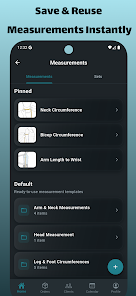
Measurement entries are flexible, supporting both metric and imperial units. The app includes common ease allowances and notes fields for fit preferences. For users who work with multiple fitting systems—such as block patterns and commercial sizing—the app stores size conversions and alteration notes, helping maintain consistency across projects.
Sew Assistant is optimized for modern Android devices to ensure smooth scrolling through high-resolution images and quick loading of pattern files. The app keeps local data for offline access and offers optional cloud syncing to back up projects and share them across multiple devices. Background sync is configurable to conserve battery and mobile data.
The app can export pattern and material lists to common formats and supports simple image attachments for reference photos. While not a pattern-drafting CAD tool, Sew Assistant pairs well with design software by holding reference data, photos, and alteration histories in one place. Many users combine it with drawing or flat-pattern apps for a complete workflow.
New users can set up a project in minutes by entering a few key measurements and selecting a pattern from the library or creating a custom entry. The guided setup walks through material estimates, basic fit notes, and a suggested timeline based on complexity. Helpful contextual tips appear on first use and can be disabled once you are comfortable with the interface.
Sew Assistant aims to reduce the friction around planning and finishing sewing projects by centralizing measurement data, pattern history, and material inventories. Regular updates add refinements based on community feedback, so the app evolves around real user needs while keeping everyday workflows efficient and reliable.