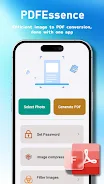

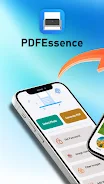

PDFEssence is a focused mobile utility for turning photos and images into clean, shareable PDF documents quickly. PDFEssence places the essential tasks within easy reach: pick images, make simple adjustments, arrange pages, and export a high-quality PDF that you can save to your device or share with other apps. The interface is intentionally compact so that the app stays out of the way of your workflow and helps you produce usable documents with minimal fuss.
The core function of PDFEssence is straightforward: select one or many images from your gallery, camera roll, or a folder, then compile them into a single PDF file. You can reorder pages by dragging thumbnails, rotate and crop images to remove unwanted borders, and choose orientation for each page. The app focuses on reliable, repeatable document creation rather than a wide array of advanced editing tools, which keeps the experience fast and predictable.
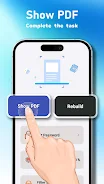
Workflow in PDFEssence follows a short, step-by-step structure that mirrors how people actually prepare documents on the go. First, import photos with a few taps. Next, edit each image using basic controls—crop to frame content, rotate to correct orientation, and adjust simple fit options so images fill the page as you prefer. Third, arrange the order of pages by dragging thumbnails into place. Finally, export to PDF and choose how you want to save or share the finished file. This linear flow reduces cognitive load and makes repeated tasks feel intuitive.
Controls are kept familiar and touch-friendly: tap to select, long-press to activate drag-and-drop ordering, pinch to zoom while cropping, and on-screen buttons for rotate and fit. Labels and icons are designed to be readable at a glance so you can move through each step without hunting for functions. The app minimizes modal dialogs and keeps confirmations simple, letting you correct a step quickly if you change your mind.
PDFEssence offers modest but useful layout options that let you tailor how images appear on the exported pages. Choose portrait or landscape orientation, decide whether an image should be scaled to fit or centered with margins, and preview the final layout before exporting. The visual design of the app is clean and utilitarian: neutral colors, clear typography, and uncluttered screens help you concentrate on arranging pages rather than navigating menus.
The app handles batches of images so you can convert entire sets at once instead of processing each photo individually. For users who frequently create similar documents, the repeated workflow becomes faster as familiar steps are performed quickly. While PDFEssence does not aim to be a full authoring suite, its emphasis on predictable, efficient batch conversions gives it strong replay value for routine tasks like archiving receipts, compiling photos for reports, or preparing scanned notes.
PDFEssence is designed with clear controls and readable labels to make the app approachable across a variety of devices and screen sizes. Buttons are sized for comfortable tapping and the layout adapts to both phones and tablets. These choices help users with varying levels of dexterity or vision to complete conversions with fewer mistakes. The lightweight nature of the app also keeps it usable on older hardware where heavy editors might struggle.
Because the conversion process focuses on on-device actions, you can create PDFs without relying on cloud uploads or online services, which is useful when you need privacy or have limited connectivity. Once a PDF is generated you can save it locally, send it via email, or open it in another app installed on your device. Exported files are standard PDFs compatible with most readers and storage apps.
PDFEssence is intentionally minimalist. It is not designed to replace comprehensive PDF editors that offer form support, annotations, or content-level text editing. Power users who need advanced page composition or detailed PDF manipulation may find the feature set limited. For anyone seeking a compact, dependable tool to convert images into neat PDF documents quickly, however, PDFEssence is a practical choice that keeps the process short and focused.
Use PDFEssence to assemble receipts into a single file for expense reports, convert photographed whiteboard notes into a sharable document, or compile photo evidence for simple record-keeping. The straightforward controls and predictable output make it well suited to on-the-go document creation whenever you need a clean PDF without a steep learning curve or extra features that get in the way.