

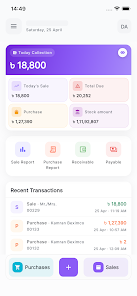
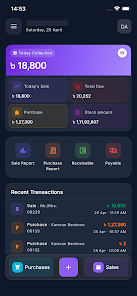
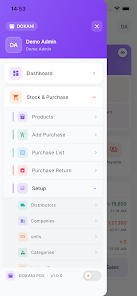
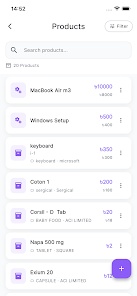
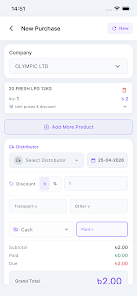
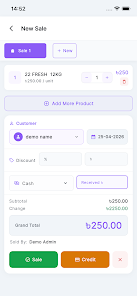
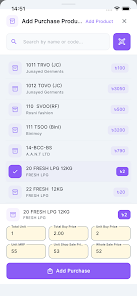
Dokani is a compact point-of-sale and inventory management app designed for small retailers and market stalls. It centralizes sales, stock tracking, and customer records into a single mobile interface, letting owners process transactions, update inventories, and view sales reports quickly without bulky hardware or a complex setup.
Dokani combines essential retail tools in a lightweight Android app that runs smoothly on most devices. Users get an intuitive checkout flow, barcode scanning support, and simple customer management. The app is built to reduce friction at the point of sale while giving shop owners actionable insight into daily performance and stock levels.
The user interface focuses on clarity and speed. Large buttons, readable product cards, and an easy-to-navigate menu mean staff can be trained quickly. Dokani’s workflow is organized around a central register screen: search or scan products, apply discounts or taxes, select payment methods, and complete the sale. Shortcuts for frequent items and a favorites section reduce repetitive input.
Inventory management is a core strength. Dokani supports bulk import of products, category grouping, and variant handling for size or color. Automated low-stock notifications help prevent out-of-stock situations, and simple adjustment logs keep a clear audit trail when you update quantities manually. These tools are particularly useful for merchants with diverse SKUs or seasonal assortments.
Dokani accepts cash and commonly used digital payments through manual entry or linked gateways where available. Receipts can be printed via compatible Bluetooth printers or sent by SMS and email. Integration options include basic accounting export and CSV download for deeper analysis. The app aims to bridge the gap between mobile selling and existing business processes with minimal setup requirements.
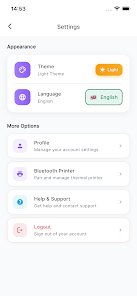
Settings let you tailor taxes, currency formats, and receipt templates to local needs. Store owners can create custom product attributes and label favorites for rapid access. While lightweight by design, Dokani allows expansion through occasional add-ons or third-party services that complement bookkeeping and inventory forecasting.
Built for Android, Dokani runs on a wide range of devices from entry-level smartphones to tablets. Its offline capabilities reduce reliance on stable networks, and background sync minimizes data conflicts. The app is optimized to consume modest memory and battery resources, making it a practical choice for vendors who must rely on mobile hardware throughout the day.
Getting started with Dokani requires creating a store profile, adding or importing products, and configuring payment and tax preferences. New users benefit from guided prompts and sample templates that shorten the first-day setup. Training materials and in-app tips help staff adopt the system quickly so stores can see value from the first transactions.
Data protection is handled through local encryption and secure sync processes when uploading to cloud storage. Regular backups are supported to prevent data loss. For troubleshooting, Dokani provides an in-app help center and contact channels for developer support, ensuring issues are resolved with timely updates and patches.
Dokani is well suited for small shopkeepers, pop-up vendors, and market traders who need a practical, mobile-first solution to manage sales and stock. Its emphasis on simplicity and reliability means merchants can focus on customers rather than complex software administration.
If you’re seeking a straightforward retail tool that balances essential features with a lightweight footprint, Dokani offers a pragmatic approach to everyday store management. Its combination of responsive design, offline readiness, and clear reporting makes it a capable companion for micro and small businesses looking to modernize operations without heavy investment.





















