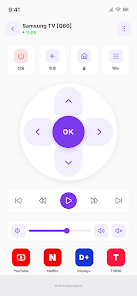
Android TV Remote - CHAMLAB reimagines your mobile device as a compact, responsive controller for Android TV devices, combining touch gestures, D-pad navigation and voice input. It streamlines media playback, app launching, and system controls into a single interface that’s quick to set up and easy to use.
Designed for users who want a smarter way to control their TV, Android TV Remote - CHAMLAB offers a mix of simplicity and advanced options. Whether you need fast channel surfing, text entry without a clumsy on-screen keyboard, or quick access to streaming apps, this remote app puts essential controls within reach on your phone or tablet.
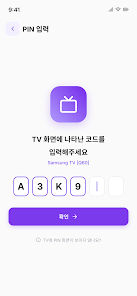
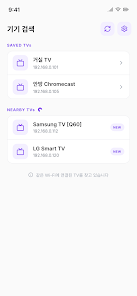
The app communicates with Android TV devices over local Wi-Fi or Bluetooth, detecting available players automatically. After granting the necessary permissions, pairing is typically a one-time step. Controls are grouped logically so you can switch from cursor mode to D-pad or keyboard with minimal taps. Connection stability and low latency are priorities, giving a near-remote feel when skipping through content or scrolling long menus.
Start by enabling network discovery on your TV and allowing the app access to local network services. The discovery process lists compatible devices and shows connection status. If auto-discovery fails, manual entry using an IP address or pairing code is supported. The setup flow keeps prompts clear and avoids technical jargon.
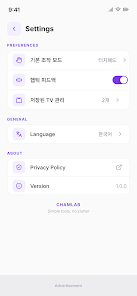
Android TV Remote - CHAMLAB recognizes that every living room setup is different. Users can rearrange buttons, enable a persistent numeric keypad, or switch between dark and light themes for low-light viewing. Advanced users will appreciate the ability to change sensitivity for the touchpad and configure long-press actions for shortcuts.
The interface emphasizes clarity: large icons, readable labels, and quick access to current playback information. Animations are subtle so they don’t add input lag. In practical use, response times are snappy on modern phones and TVs, and the app conserves battery by dimming non-essential elements while idle.
For the most consistent experience, keep both phone and Android TV on the same Wi-Fi network and avoid overly congested bands. If you encounter delays, toggling the connection or restarting the app often restores full responsiveness.
Beyond basic playback control, the app is useful for entering lengthy search terms, controlling presentations on a TV, or managing multiple media apps from a single interface. Families find it handy for quickly switching profiles or controlling children's viewing time with easy-to-access parental controls.
Install the app from a trusted store, enable the required permissions, and follow the on-screen pairing instructions. Keep the TV and phone on the same network, accept pairing prompts, and test playback controls immediately to confirm a good connection. Regular updates bring bug fixes and new features, so check for updates periodically.
Android TV Remote - CHAMLAB blends convenience with thoughtful controls, making it a valuable tool for anyone who wants a cleaner, more flexible way to manage their Android TV experience from a mobile device.