USB Volume Unlocker is a compact Android utility that restores system volume controls when connected to USB accessories. It detects audio routing changes and automatically re-enables volume keys and sliders, simplifying audio management for users who plug in headsets, car systems, or USB DACs.
Designed for everyday use, USB Volume Unlocker targets a common annoyance: when an Android device hands over audio output to a USB device, system volume controls sometimes become unavailable or behave unexpectedly. This tool intercepts those changes and maintains consistent control over media, call, and notification volumes without requiring advanced setup.
The app monitors USB connections and audio routing events at the system level. When a USB accessory is attached, USB Volume Unlocker evaluates whether default volume controls remain active. If the controls are suppressed, it injects the necessary signals so the hardware keys and on-screen sliders keep functioning. The process runs in the background with minimal battery impact.
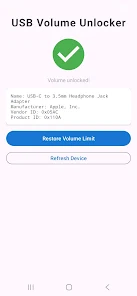
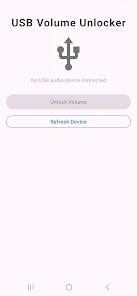
USB Volume Unlocker keeps its interface intentionally straightforward. Settings are presented as a short list of toggles and exceptions. A clear status indicator shows when a USB accessory is detected and whether the app has applied a fix. Performance-wise, most users report instant response with no perceptible lag during media playback or calls.
For commuters who connect phones to car stereos, USB Volume Unlocker ensures that volume buttons still manage phone audio regardless of the head unit’s behavior. Audiophiles using external USB DACs can retain system-level control over output levels. Even when testing audio on development rigs or using USB headsets for calls, the app removes an extra configuration step.
The utility is built to work across a wide range of Android versions and hardware. While it functions reliably on standard OEM builds, behavior can vary slightly on heavily customized or rooted systems due to altered audio frameworks. A compatibility check inside the app helps identify a device’s baseline support and suggests alternate settings if necessary.
USB Volume Unlocker requests a minimal permission set focused on audio control. It does not transmit personal data off the device. Users who manage sensitive environments should still review permissions and the app’s privacy notes before enabling broad system hooks.
Installing the app takes only a few steps: grant the requested permissions, allow the app to monitor audio routing, and optionally set profiles for different accessories. The onboarding guide provides a brief walkthrough and a diagnostic tool to validate that volume keys behave correctly after setup.
Many users retain USB Volume Unlocker because it solves small but frequent frustrations without adding complexity. It acts quietly, restores control where Android’s default behavior falls short, and helps maintain a consistent listening and calling experience across devices.