
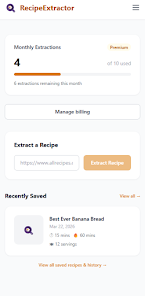

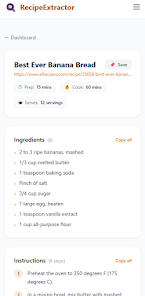
Recipe Extractor is a compact utility that pulls the essential information from any recipe webpage so you can quickly see the dish name, ingredients list, and step-by-step instructions without wading through ads or long commentary. Recipe Extractor places the core recipe content front and center, making it faster to save, print, or follow a recipe while cooking or planning a meal.
The extraction engine isolates common recipe elements such as title, estimated yield, ingredient lines, preparation steps, and basic timing when available. Recipe Extractor removes site clutter and inline ads to present a clean, readable layout, and it recognizes many common formatting patterns used across blogs and cooking sites. The app is designed to accept a URL or to receive shared pages from your browser, then produce a plain, distraction-free version of the recipe that is easy to copy, export, or print.
Using the app is straightforward: paste a recipe URL into the input field or use the system share option from your web browser to send the page to Recipe Extractor. After tapping extract, the app displays the parsed title, ingredients, and steps in a simple reader view. From there you can select text to copy, use a built-in print option, or share the cleaned recipe text with other apps. The controls are intentionally minimal so extraction remains fast and predictable.
The interface favors clarity over decoration, employing high-contrast text, generous line spacing, and selectable text blocks so you can quickly skim ingredients or follow preparation steps. Adjustable text size helps readability in different lighting conditions and on a variety of screen sizes. The streamlined presentation reduces cognitive load so the recipe becomes the only thing you need to focus on while cooking.
Recipe Extractor focuses on extraction and temporary storage to support typical cooking workflows. Extracted recipes can be saved locally or exported to plain text for inclusion in notes or a document folder, allowing you to build a personal collection outside of the app if you wish. There is no built-in meal planning or grocery list system, which keeps the app small and focused; instead you can export content to other tools that handle planning and shopping lists.
The app supports common accessibility considerations by offering adjustable text size and a clean layout that works well with screen readers and other device-level accessibility features. Once a recipe has been extracted and saved to device storage, it remains available offline so you can consult it in the kitchen without an internet connection. This makes Recipe Extractor useful for meal prep in places with limited connectivity.
With a download size of about 1 MB and support for Android 5.0 and up, the app is optimized for low storage and modest hardware. Extraction typically completes quickly and uses minimal background resources, helping preserve battery life. The lightweight architecture prioritizes reliability over flashy effects, so it performs well on older or lower-end devices.
Although the extractor handles many common recipe formats, it may not perfectly parse pages that rely heavily on dynamic scripts, nonstandard markup, or images in place of text. Recipe Extractor is intentionally focused on the core task of extraction and does not include advanced features such as meal planning, automated grocery lists, or built-in timers. These omissions reduce complexity and keep the app small, but they are intentional trade-offs to maintain fast, dependable operation.
Offered by DadBytes, Recipe Extractor is maintained as a simple utility for users who want quick access to recipe content. Current version 7 was released on Mar 22, 2026 and updated on Mar 27, 2026. The app requires Android 5.0 and up and typically downloads as a 1 MB package. Listed downloads show 1+ installs and the content rating is Everyone.