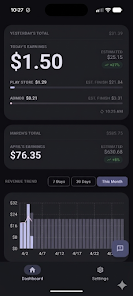
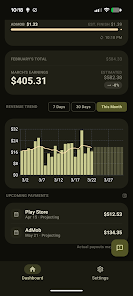
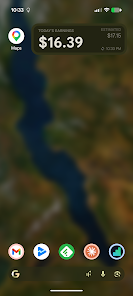
App Revenue Tracker gives Android developers a fast, focused way to monitor store and ad income without wading through multiple dashboards. App Revenue Tracker opens to today’s total earnings and a clear breakdown between purchases, subscriptions and ad revenue, plus an estimated end-of-day figure and a month-to-date projection so you can act before the month closes. Designed for quick daily check-ins, the app surfaces the revenue metrics that matter to your monetization decisions rather than overwhelming you with unrelated analytics.
The core of the experience is a compact dashboard that displays today’s earnings, a breakdown by revenue type, and short-term projections. You can switch between 7-day, 30-day and monthly trend views to compare recent momentum and longer patterns. Clean, readable charts highlight growth, slow periods and anomalies, and lightweight visual summaries help you spot spikes or declines at a glance. The interface favors clarity: you’ll see the numbers you need immediately, without extra clutter.
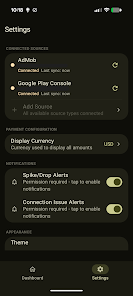
Setup is intentionally simple so you can begin checking revenue in minutes. After connecting your store and ad data sources, App Revenue Tracker lets you choose which accounts and income streams appear on the main screen. Navigation uses straightforward gestures and native Android controls: tap a metric to expand details, swipe to change time ranges, and use in-app filters to focus on purchases, subscriptions or ad earnings. The app supports selective syncing so you control how much historic data is downloaded and retained on your device.
Rather than a progression system like a game, the app’s progression is practical: from initial connection to daily habit. You can customize the dashboard layout, set thresholds for automated alerts, and enable push notifications for significant dips or unexpected spikes. Monthly and end-of-day projections help you plan promotions, pricing tests or ad strategy adjustments. Customizable reporting windows let you track trial conversions, subscription renewals or ad revenue changes over the exact periods you care about.
App Revenue Tracker uses a lightweight native Android design based on Material Design 3 principles, prioritizing legibility and fast rendering on a wide range of devices. Charts are deliberately uncluttered: labeled axes, contrasting color bands for different revenue streams, and clear annotations for projection points. Large-font modes and high-contrast options make it easier to read figures on small screens or in bright environments, and every chart includes accessible descriptions for screen readers.
The app is built for frequent use without draining resources. It caches recent summaries so you can view the last synced revenue figures offline, and incremental sync reduces network and battery overhead. When connectivity is restored, App Revenue Tracker picks up incremental changes and adjusts projections accordingly. Because the focus is on revenue checks rather than heavy analytics computations, the app remains responsive even on mid-range devices.
App Revenue Tracker is aimed at indie developers, small studios and product managers who need a quick, accurate view of monetization performance. It helps you detect revenue dips or spikes early so you can iterate on pricing, promotions or ad placements while there’s still time. It is not intended as a full analytics platform: detailed user engagement, attribution modeling or deep funnel analysis are outside its scope. If you need full marketing and behavioral analytics in one package, you should pair this app with your existing analytics tools.
Accessibility options include adjustable text sizes and high-contrast themes, while data handling focuses on minimal local storage and secure transfers for synced summaries. You always control which accounts are connected and what data is displayed. For teams that prefer a quick, privacy-conscious revenue check, the app balances useful projections with conservative data retention and clear controls for what stays on your device.