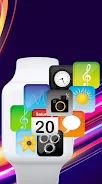
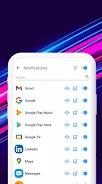
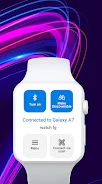
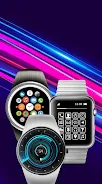
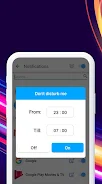

SmartWatch Sync connects your Android phone and your smartwatch over Bluetooth to mirror notifications, display messages and let you handle calls from your wrist, making it simple to stay reachable without reaching for your phone. SmartWatch Sync is built for commuters, exercisers and busy users who want glanceable access to essential alerts, with an emphasis on a clear setup flow and low-friction daily use. The app brings incoming alerts to your wearable, supports quick message reading and call responses, and includes a set of on-watch productivity tools so your wrist becomes a convenient extension of your phone.
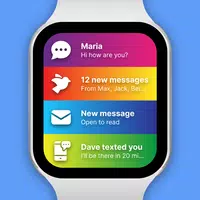
Notifications, messages and incoming calls are mirrored to the watch in near real-time; you can read a message, dismiss a notification or accept and reject calls directly from the watch interface. The controls are optimized for small screens: taps, long-presses and simple swipe actions are used to navigate alerts and trigger replies, while vibration patterns and visual badges help you prioritize at a glance. SmartWatch Sync also offers configurable quick-reply templates and silent actions so you can respond without typing when you’re on the move.
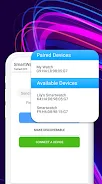
Pairing follows a guided six-step setup with illustrated instructions to make initial synchronization straightforward. During setup the app checks compatibility and proposes recommended settings; as you use the watch, suggested adjustments appear to improve notification delivery and battery life. This stepwise progression is designed to reduce friction: basic functionality is available immediately, while optional adjustments (theme tuning, selective notification rules, or PRO features) can be activated as you become more familiar with the app.
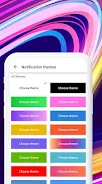
SmartWatch Sync includes multiple color palettes and notification themes so the watch display can match your style or improve readability. Theme options change text size, contrast and layout density to suit different screen sizes and lighting conditions. You can assign distinct visuals to different app categories or contacts, and set priorities so urgent alerts use a louder vibration and higher-contrast presentation while low-priority items remain unobtrusive.
The app supports common daily modes—such as commute, workout and meeting profiles—that adjust which notifications appear and how they behave. These modes are easy to toggle from the phone or directly on the watch, and they encourage repeated use by streamlining what matters during each activity. Because the core functionality is useful every day, SmartWatch Sync provides high replay value: users typically check and customize settings over time as their routines evolve.
Built-in productivity features let you add quick reminders, create simple notes and schedule events directly from the wearable. These controls are intentionally minimal so actions remain fast on small screens: a quick tap creates a reminder, a preset timer starts from the watch face, and notes sync back to the phone for later review. The tools are designed to complement notifications rather than replace a full phone-based planner.
SmartWatch Sync works over Bluetooth and is designed to operate without an active internet connection for core features; notification mirroring and on-watch actions persist while the paired devices are within range. The app supports a broad set of watch brands and third-party models, including mainstream makers such as Samsung, Garmin and Xiaomi and several Chinese models. Because behavior depends on each watch’s underlying firmware, functionality may vary for extremely basic or proprietary devices.
Accessibility is a priority: adjustable font sizes, high-contrast themes and customizable vibration strengths make notifications easier to perceive. The interface focuses on clear, readable layouts and consistent interaction patterns so both new and experienced users can find what they need quickly. A detailed illustrated tutorial and contextual help prompts reduce setup friction and support ongoing discovery of features.
Bluetooth range and pairing quality will vary with hardware and environment; if you experience missed notifications, bringing devices closer or re-establishing the connection typically resolves the issue. Background operation is optimized to minimize battery impact on both phone and watch, but enabling constant sync or certain advanced themes can increase power use. The PRO upgrade removes ads and unlocks finer control over which contacts or apps generate notifications, while basic functionality remains available in the free version.
SmartWatch Sync processes notifications locally and only accesses data necessary to present messages and call information on your wearable. Regular updates add compatibility improvements and small feature enhancements rather than large, disruptive changes, and clear changelogs help you understand what each release delivers. If you rely on your wearable for day-to-day notifications, SmartWatch Sync offers a practical, configurable bridge between phone and wrist without adding unnecessary complexity.