



Howbout is a social calendar app that helps you stay connected with friends by showing what they are doing, surfacing upcoming events, and making it easier to turn casual ideas into confirmed plans. Howbout combines a friends only activity feed with built in chat, availability tools and simple polls so groups can decide on times without endless messages. The app also supports calendar sync, countdown widgets, photo attachments for pinned events and invite links, while giving you granular controls over who sees each event so you can share selectively with Close Friends or keep plans private.
Howbout centers around a curated activity feed that highlights real plans from people in your circle, not public posts. Built in chat threads are attached directly to event items so conversations stay contextual and easy to reference. Availability views let everyone mark free times, and time polls collect preferences to pinpoint the best option for a group. You can sync external calendars into Howbout to see all commitments in one place, add countdown widgets to homescreens for important dates, attach photos or notes to pinned events, and generate invite links to bring others in without repeated messages.
Creating a plan in Howbout follows a simple workflow: jot down an idea, propose several time options, invite friends or a Close Friends subset, and collect responses until the group agrees. Event creation is designed to be quick with a few taps to add a title, location or photo, and an optional poll to suggest multiple dates. Responding takes one tap and all replies are visible in the event thread. Notifications surface important changes so you do not miss confirmations or updates. The feed emphasizes confirmed and tentative plans so you can scan what is likely to happen this week at a glance.
The app uses familiar calendar controls: tap to view details, long press to edit or change visibility, and drag to reschedule on week and month views. Events typically progress from idea to tentative to confirmed based on participant responses, and you can mark items as pinned when they become fixed plans. Recurring events and reminders help you manage ongoing commitments, while RSVP tracking and compact group threads reduce the need for separate messaging apps. All interactions are optimized for quick decisions rather than long text conversations.
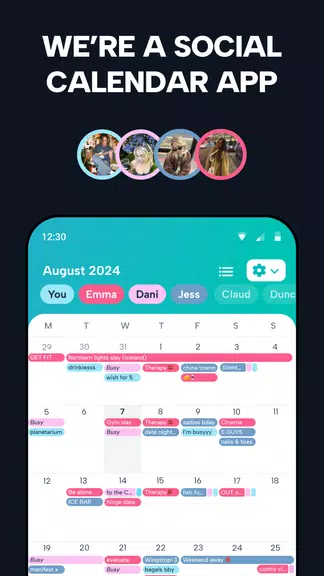
Howbout presents a clean, color coded calendar interface that makes it easy to distinguish personal calendars from shared activities. You can assign colors to different calendars and set visibility levels per event with options such as All Friends, Close Friends, or No One. Countdown widgets are customisable to show days and hours until a pinned event, and photo attachments appear in event headers to give plans a visual context. Note that when viewing a friend’s calendar, your own synced calendars may temporarily display as a single color, which some users find disorienting; this is a trade off of the combined view design.
Howbout aims to be accessible across devices with adjustable text sizes, clear contrast themes and labels that are compatible with screen readers. Keyboard navigation and large tap targets are supported for easier use on phones and tablets. For times when you are offline, the app caches recent events and allows you to draft messages or polls; these actions queue locally and synchronize automatically once a connection is restored so you do not lose planned updates while travelling or on intermittent networks.
Privacy is a core consideration in Howbout. Every event includes granular visibility settings so you decide who sees the details, and you can create a Close Friends list for selective sharing. Invite links let you add participants without exchanging contact details, and you always control whether an event is public to your circle or hidden. Account settings let you manage notifications and connected calendars independently so you can limit what is shared externally.
Howbout simplifies organising meet ups by moving planning out of cluttered group chats and into structured event threads, reducing back and forth when picking times. Integrated polls, availability checks and countdowns keep conversations focused on decisions rather than logistics. At the same time there are a few limitations to be aware of: Howbout does not provide a separate shared group calendar where everyone can add to a single communal schedule, and you cannot view availability for people who are not your friends on the app. Those trade offs reflect a design choice toward privacy and friends only sharing, but invite links can help include occasional participants.
If you need a focused tool for coordinating real world plans with people you know, Howbout offers a practical balance of scheduling tools, privacy controls and contextual chat. Install the app to try the activity feed, create your Close Friends list, and begin turning ideas into plans with fewer messages and clearer confirmations.