
CutList Optimizer is a practical Android utility that converts raw material sizes into efficient cutting plans, minimizing waste for carpenters, hobbyists, and small shops. It automates layout decisions, tracks stock, and produces printable lists and diagrams so you spend less time planning and more time building.
Designed for anyone working with sheet goods, lumber, or metal plate, CutList Optimizer streamlines the process of turning design cuts into real-world patterns. The app balances material usage against practical constraints like blade kerf, grain direction, and inventory limits. Rather than fiddling with spreadsheets or manual sketches, users get calculated layouts that save both time and money.
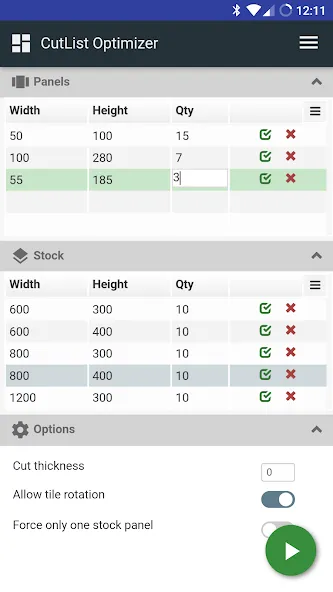
At its heart, CutList Optimizer focuses on generating optimized cut lists from user-entered dimensions. It supports multiple stock sizes, can handle repeated parts, and allows the specification of saw blade width. The algorithm tries to pack pieces in a way that reduces leftover scrap while respecting orientation rules and user preferences.
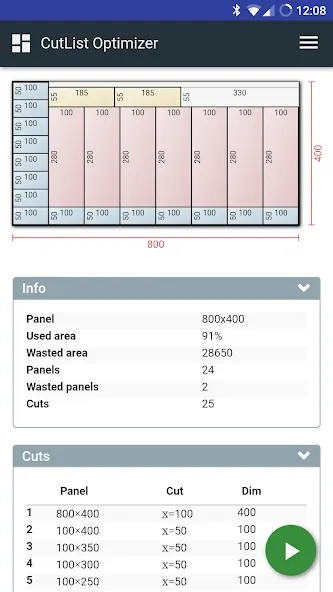
After defining stock pieces and target parts, the app runs a packing algorithm that tests multiple layouts and selects one that minimizes unused area. Users can choose different optimization strategies: fastest layout, least waste, or balanced approach. The tool also flags situations where your current inventory won’t cover the requested parts and suggests the minimum additional stock required.
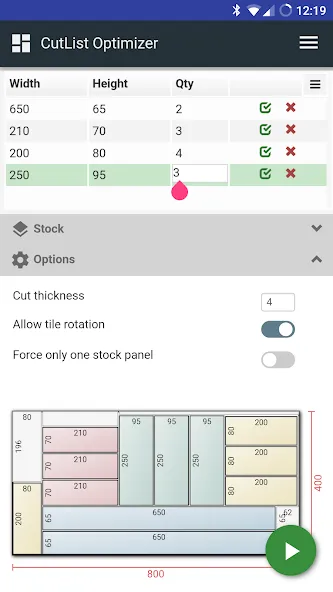
CutList Optimizer puts practical controls up front: clear input fields, toggles for orientation rules, and a thumbnail preview of each suggested layout. Performance is snappy on modern Android devices; most small to medium projects produce results in a few seconds. For very large batches, the app presents intermediate layouts so you can inspect progress without waiting for completion.
Granular settings let you adapt the app to different tools and materials. Set grain direction constraints for veneered panels, define minimum scrap sizes to avoid unusable remnants, and lock specific parts to particular stock pieces. These options make CutList Optimizer suitable for both hobbyists and light-production shops that need reliable, repeatable outputs.
Experienced users appreciate the way the app integrates into workshop workflows: it reduces material ordering errors and makes job costing more predictable. CutList Optimizer’s export features let you save CSV summaries and PNG layout diagrams that can be included in job sheets or handed to colleagues.
Installation is straightforward from the Android marketplace. After granting storage permissions for exports, create a new project, add available stock sizes, and list the parts you need. The app walks you through optimization presets and offers sample projects for testing. If you use multiple devices, export and import project files to keep records synchronized.
Woodworkers, kitchen cabinet makers, metal fabricators doing small runs, and DIY enthusiasts will find the app especially helpful. It’s not a CAD replacement but a focused utility that bridges design dimensions and efficient shop execution. For anyone who wants to reduce waste and speed up the layout stage, CutList Optimizer is a pragmatic addition to the toolkit.