



Dots and Boxes brings the classic pencil-and-paper strategy game to Android with clean visuals and simple touch controls. Players connect adjacent dots to form squares, attempt to create long capturing chains, and outscore opponents across adjustable board sizes and skill settings for a compact, turn-based mental challenge.
The rules of Dots and Boxes are elegantly minimal: tap between two neighboring dots to draw a line, and if that move completes a square you claim it and earn an extra turn. The app preserves this straightforward flow while adding polish — responsive input, clear ownership markers for completed boxes, and automatic scoring that keeps the tempo brisk.
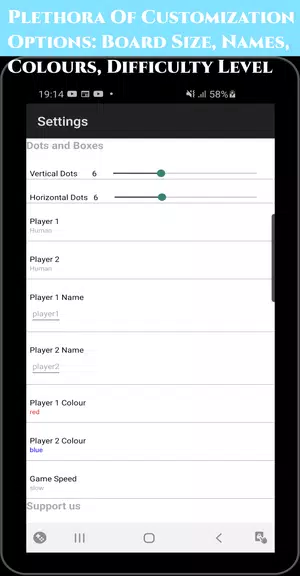
Players can choose a variety of match types to suit different sessions. Single-player mode pits you against AI opponents with scalable difficulty, while local two-player options let friends share a device for quick head-to-head rounds. Customizable board grids — from small 3x3 setups to larger 9x9 challenges — enable short casual games or lengthy strategic battles.
Dots and Boxes rewards planning and timing. Early moves are about avoiding giving the opponent an easy capture; midgame play often focuses on forcing parity and creating double-cross opportunities. A well-timed sacrifice can flip momentum by setting up a long chain that hands control to the player who completes it. Advanced strategies include counting moves to the last open edge and steering the game toward favorable endgame shapes.
The interface keeps the board uncluttered so decisions remain front and center. Lines and boxes animate crisply when claimed, and subtle color schemes distinguish players without distraction. Touch targets are tuned for mobile use, with undo options and move highlighting to support deliberate play. Visual clarity makes it easy to spot potential chains and threats at a glance.
Artificial opponents vary from casual to competitive, offering practice partners for different goals. Lower difficulty settings introduce predictable responses appropriate for learning the rules. Higher tiers simulate deeper planning and are designed to force you to think several moves ahead. The AI adapts to board size, so strategies that work on a small grid may need revision on larger layouts.
Controls are purpose-built for touchscreen devices: tap or drag to add a line, with optional confirmations for new players. Adjustable settings let you change visual contrast and sound effects, and turn timers can be enabled to keep games moving. The app’s layout is readable even on smaller phones, and spacing ensures reliable taps for fast exchanges.
Begin by avoiding playing the third side of a box unless it’s part of a deliberate tactic. Watch for chains of two or more adjacent potential boxes and calculate who will be forced to open them. Practice counting moves toward the endgame so you can dictate parity and take long sequences of squares. Regularly playing different board sizes sharpens pattern recognition and endgame control.
The appeal of Dots and Boxes lies in its depth beneath a simple rule set. Each match evolves differently depending on board size and opponent tendencies, creating a consistent loop of quick puzzles and tense finales. Casual players enjoy the simplicity and short playtimes, while competitive users can focus on refinement of tactics and reading opponents.
Launch a new match by choosing board size and opponent type, then tap to place your first line. Use the built-in hints or play a few easy AI rounds to get comfortable with chain patterns. As you progress, increase difficulty or experiment with larger grids to extend the challenge and develop sharper endgame instincts.