
Faketalk is a mobile utility that creates believable simulated conversations and media for storytelling, pranks, or mockups. Designed for casual users and content creators, it combines flexible dialog templates, simple media import, and quick export options so you can craft realistic-looking chat screens and voice snippets in minutes.
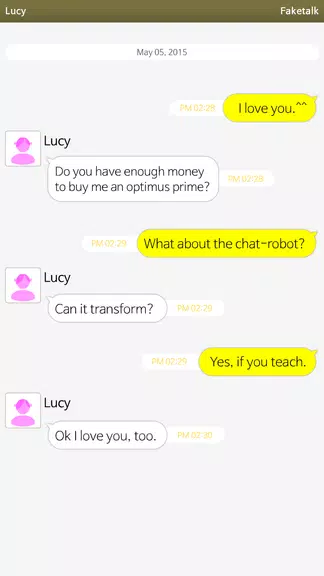
At its core, Faketalk lets you generate fake chat messages, call logs, and short audio clips that resemble popular messaging platforms. The app focuses on visual authenticity: customizable message bubbles, timestamps, profile images, and background themes help produce screens that look like genuine interactions for use in presentations, mockups, or social posts.
The interface is arranged around a central canvas that previews the conversation as you build it. Controls for editing message content, changing timestamps, and switching display styles are presented in a side panel. The learning curve is low; you can move from blank canvas to a shareable image within minutes. Faketalk balances simplicity with enough control to satisfy creators who need precise visual outcomes.
Customization is where Faketalk stands out. You can adjust font sizes, bubble shapes, and color schemes to approximate different messaging platforms without copying exact designs. Profile avatars can be uploaded or chosen from an included library, and message alignment toggles let you mimic sender versus receiver layouts. A built-in timestamp editor allows you to set exact dates and times for each message, improving realism for staged scenarios.
People use Faketalk for a variety of legitimate reasons: creating visual prototypes for app designs, producing content for social media storytelling, rehearsing customer support scripts, or making illustrative materials for training. The app is useful for marketers, writers, teachers, and anyone who needs believable mock conversations without lengthy design work.
While Faketalk is a powerful tool, creators should be mindful of ethical boundaries. Avoid using generated content to deceive others in harmful ways, impersonate individuals, or spread misinformation. The developers recommend clearly marking staged materials when used in public contexts to maintain transparency.
Faketalk is optimized for modern Android devices and runs smoothly on mid-range hardware. Graphic rendering is efficient, so complex scenes with images and multiple message threads remain responsive. File exports are compact, and the app provides options to reduce resolution for faster uploads or larger images for print-quality output.
Faketalk is favored for its straightforward design tools and speed. It removes the technical overhead of photo editing software while still delivering convincing visual outcomes. The app’s template library and export features save time during rapid prototyping and social content production.
To begin, open Faketalk, choose a template or start from blank, add participants, type messages, and customize the look. Preview frequently and export when satisfied. New users will appreciate the guided prompts and undo functionality that make experimentation low-risk.
Faketalk blends practical controls with an approachable UI, making it a solid choice for anyone who needs realistic chat mockups or staged media without the complexity of professional design tools.