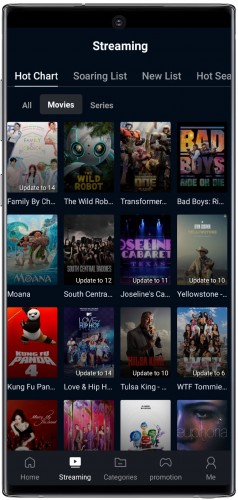
PPCine (En) is a lightweight, versatile Android media player designed to make video playback straightforward and reliable on a wide range of devices. PPCine (En) combines practical playback tools with a clean interface so you spend less time configuring and more time watching, whether you are playing local files, streaming from a home server, or using downloaded content for offline viewing.
The player focuses on stable, predictable playback mechanics: accurate seeking, reliable resume points, smooth speed control, and support for chapters and bookmarks so long videos are easy to navigate. PPCine (En) handles variable frame rates and bitrate changes gracefully through adaptive buffering, and offers playback speed from slow-motion to faster-than-real-time for study or preview. The internal timeline and chapter handling act like a simple progression system, letting you mark positions, return to last viewed points automatically, and queue multiple files for continuous playback without manual intervention.
The interface emphasizes large, readable controls and gesture-driven navigation. Swipe gestures adjust brightness and volume, double-tap rewinds or fast-forwards configurable intervals, and pinch-to-zoom changes aspect ratio and crop quickly. For accessibility, the app supports enlarged UI elements, high-contrast themes and subtitle font scaling so viewers with vision differences can customize text size and color. Haptic feedback on gestures is optional, and tap targets remain responsive when using screen readers or accessibility services.
PPCine (En) organizes media by folder view, publication date, and by smart collections generated from file metadata and watched status. Playlists act as a simple progression system: you can create sequential queues, save position-aware playlists that remember where you stopped, and export or import these playlists as standard M3U files. Thumbnail generation and embedded metadata help you browse long collections quickly, and the folder-first approach keeps level structure intuitive for users who mirror their desktop or NAS layouts on mobile.
The player supports a broad list of common containers and codecs such as MP4, MKV, AVI, MOV for video and MP3, AAC for audio, while recognizing embedded streams and multiple audio tracks. Hardware-accelerated decoding is available on many devices to reduce battery use and provide smoother playback on lower-end hardware. Network streaming works over HTTP, FTP and SMB protocols so files stored on local servers and NAS devices can be accessed without copying them to the device.
Subtitle handling is a strong suit: PPCine (En) reads SRT, ASS and SSA formats as well as embedded subtitle tracks. You can fine-tune font size, color, background opacity and timing offsets to match audio, and the player allows easy switching between subtitle streams and audio tracks for multi-language content. External subtitle files can be loaded manually or searched for when internet access is available, and persistent subtitle settings can be applied per-language or per-folder to match different viewing preferences.
Casting features allow output to compatible devices and the app supports DLNA/UPnP discovery for local servers. Built-in HTTP streaming and playlist handling permit continuous play of online sources while preserving resume points for supported streams. The source manager makes it straightforward to add network shares and cloud storage providers so you can open remote folders directly; transfers only occur when you explicitly browse or download files, keeping data usage predictable.
Users can personalize the look and behavior of PPCine (En) with theme options, layout choices and audio presets. Default playback behaviors such as preferred audio track, subtitle language and playback speed can be set globally or per-folder. Equalizer presets and balance controls let you tune output for headphones or external speakers, while pinning favorite directories and creating pinned playlists keeps commonly used libraries within quick reach, improving day-to-day workflow.
Privacy-conscious design minimizes permissions and offers an optional passcode to protect private folders. Local playback does not require an account and network features remain disabled until configured. Offline play is supported by direct file saving and by robust resume playback so users can download videos for travel and pick up exactly where they left off without depending on a network connection.
Built to perform across a variety of hardware, PPCine (En) balances CPU load with hardware acceleration and adaptive buffering for less stutter on unstable connections. Regular updates address compatibility with new Android releases and codecs, and in-app diagnostics assist with troubleshooting. The app keeps logs for crash reporting to speed up fixes while avoiding automatic data uploads unless the user opts in.
Getting started is straightforward: grant access to media folders, scan or add specific directories, and set playback defaults to your preference. A brief tutorial walks through gesture controls, subtitle adjustments and casting steps. PPCine (En) is practical for offline viewing on flights, home media streaming from a NAS, language learning through alternate audio and subtitle tracks, and long trips where low-power decoding and reliable playlist management matter most.