



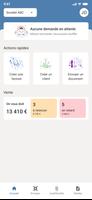



DG EXPERTS is a professional-grade Android application that streamlines diagnostic, management and reporting tasks for technical teams. It combines an intuitive interface with robust tools to help users inspect systems, generate actionable reports and coordinate workflows efficiently across devices and locations.
DG EXPERTS offers a suite of tools designed for field technicians, IT administrators and operations managers. Key modules include system diagnostics, live monitoring, automated report generation and task scheduling. Each module is built to minimize manual steps: diagnostics run with one tap, live feeds update in real time, and scheduled checks trigger alerts when thresholds are exceeded.
The app prioritizes a clean, task-oriented interface so users can move from inspection to resolution without interruption. A dashboard aggregates critical metrics and recent activity, while context-aware menus surface the most relevant actions. Workflows are configurable: users can create templates for recurring jobs, assign tasks to team members, attach photos or logs, and mark stages of completion with time-stamped notes.
DG EXPERTS supports common data exchange formats and integrates with widely used cloud services and ticketing systems. Export options include CSV, PDF and structured JSON, allowing reports to be imported into third-party analytics platforms or archived for compliance. APIs and webhook support make it possible to automate handoffs between DG EXPERTS and other operational tools, reducing duplicate entry and improving traceability.
Performance is optimized for Android devices across a range of hardware profiles. The app adapts to different screen sizes and maintains responsiveness during long diagnostic operations. Background processing handles uploads and scheduled tasks without draining battery excessively. Compatibility statements outline supported Android versions and recommended minimum hardware for optimal performance.
Security is central to DG EXPERTS. Authentication options include single sign-on and multi-factor authentication, with role-based access control to restrict sensitive functions. Data at rest is encrypted and communication channels use TLS. Audit logs track user actions and changes to configuration, supporting internal reviews and external audits when needed.
Organizations can tailor DG EXPERTS to fit specific operational requirements. Custom fields, forms and checklists allow teams to capture the exact data they need. The app scales from solo technicians to enterprise deployments through centralized management features, enabling administrators to push templates, update configurations and monitor usage across hundreds of devices.
Field teams use DG EXPERTS to run pre-deployment checks and post-service verifications, while IT teams leverage it for routine health checks and incident triage. Maintenance crews can schedule regular inspections and receive alerts when equipment drifts from expected parameters. The same platform supports compliance reporting by consolidating logs and measurements into a single, exportable document.
DG EXPERTS ships with in-app help, step-by-step guides and an online knowledge base to speed onboarding. Regular updates deliver performance improvements, new integrations and security patches. An enterprise support channel is available for prioritized assistance and custom integration work.
DG EXPERTS is aimed at professionals who need reliable diagnostic tools and streamlined reporting on mobile devices. It suits service providers, infrastructure teams and maintenance organizations that require consistent procedures, remote coordination and airtight documentation. With a balance of configurability and out-of-the-box functionality, the app reduces time spent on administrative tasks and improves the clarity of field data.
Getting started with DG EXPERTS involves installing the app, registering your organization, and importing or creating a few sample templates. From there you can scale usage, refine workflows and connect to your existing systems to unlock productivity gains and better insight into operational health.





















