

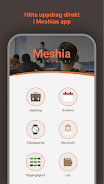
Meshia is a modern productivity hub that brings documents, tasks, and team conversations into a single visual workspace. Designed for professionals and small teams, Meshia streamlines collaboration with integrated tools, customizable boards, and real-time syncing across devices to reduce context switching and speed up decision-making.
Meshia concentrates common workplace needs into one app so you can move from idea to outcome faster. At the core are flexible boards that combine notes, task lists, and embedded files. Each board supports drag-and-drop arrangement, comments tethered to any item, and version history so edits are traceable. Built-in timers, reminders, and goal tracking keep projects moving without external apps.
The interface in Meshia balances simplicity with depth. Menus are context-aware so beginners can get started quickly while power users unlock shortcuts and advanced filters. Visual cues such as color-coded tags, progress bars, and compact card previews make it easy to scan large boards. The mobile layout preserves functionality by prioritizing content density and touch-friendly controls.
Workflows in Meshia are based around reusable templates and customizable pipelines. You can create a template for recurring processes — such as product launches or weekly reviews — and instantiate it with one tap. Tasks carry rich metadata (priority, estimated time, dependencies) so filtering and scheduling adapt to real team rhythms rather than forcing one rigid approach.
Meshia connects with common productivity and communication tools to avoid data silos. Sync options include calendar services, cloud storage providers, and single-sign-on systems. These integrations allow files to be previewed in context, meetings to be attached to project timelines, and notifications to appear where your team already works.
Security is a priority in Meshia’s architecture. Data is encrypted in transit and at rest, while access controls let administrators define roles and permissions at the project or item level. Offline mode caches recent boards so you can keep working without connectivity, and lightweight rendering keeps the app responsive even with complex boards.
Start by mapping one real project into Meshia using an existing template; adapting a familiar workflow helps reveal which components are useful. Use automation sparingly at first to prevent noisy notifications, and favor tags and filters for cross-project visibility. Regularly archive completed boards to keep active workspaces focused and fast.
Onboarding in Meshia is designed to be quick. New users are guided through creating a first board, inviting teammates, and linking a calendar. Admins can import data from CSV or connect an existing workspace to reduce migration friction. For teams, a short adoption plan — identify champions, define two pilot projects, and gather feedback after two weeks — accelerates meaningful value.
Meshia combines familiar project concepts with a flexible canvas to support diverse work styles. Whether organizing personal tasks or coordinating cross-functional initiatives, Meshia aims to reduce context switching and make collaboration more intentional and efficient.





















