
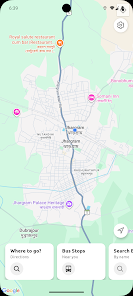
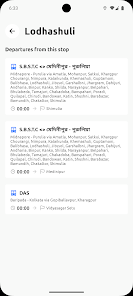
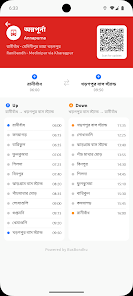
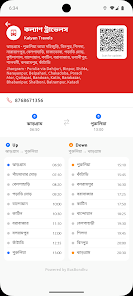
BusBondhu – Where is my bus? is a practical, real-time bus tracking app designed for everyday commuters who want to cut waiting time and uncertainty from their journeys. The app brings together live GPS positions, scheduled timetables, and historical movement patterns so you can see which vehicles are approaching, estimate arrival times, and plan trips across urban and suburban routes with confidence. The start screen highlights nearby stops and active services so you immediately know which options are close and whether a preferred service is running on time or delayed.
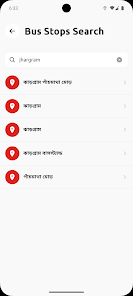
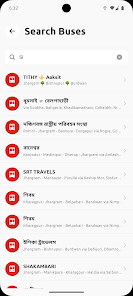
Live vehicle positions are shown on interactive route maps with smooth zoom and pan controls so you can inspect a stop, a corridor, or the entire route. Predicted arrival times are generated for each stop and updated as vehicles move, and configurable alerts notify you about approaching buses, expected delays, or the final stop before your destination. A searchable database of routes and platforms helps you find alternatives quickly, while heatmaps visualize peak service hours and vehicle density to guide choices when you prefer less crowded departures.
The app uses a layered approach to generate stable ETAs: current GPS feeds from vehicles are combined with published timetables and historical movement trends so estimates adapt when buses slow, make extra stops, or take detours. When telemetry is sparse, the system favors recent corroborating data and schedule consistency to reduce erratic changes. Occasional rider confirmations, where available, help refine predictions without exposing personal information, creating arrival times that stay useful even under variable traffic conditions.
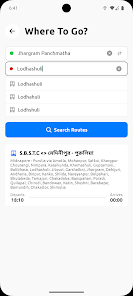
Interaction is designed for fast, one-handed use during a commute: pinch-to-zoom and pan gestures on the map, single-tap access to stop details, and a persistent search bar let you find services and stops quickly. The trip planner accepts origin and destination inputs and compares route options, showing total travel time, transfers, and walking distances so you can choose the best balance of speed and convenience. Map layers are easy to toggle for traffic overlays, wheelchair-accessible stops, and service corridors, and visual themes switch between day and night modes to preserve readability while moving through bright or low-light environments.
BusBondhu – Where is my bus? supports saved stops and pinned services so your most-used routes appear immediately on the home screen; you can group entries by work, school, or weekend trips to keep routines organized. Recurring reminders and quiet hours let the app fit into your daily rhythm, and saved trips surface live ETAs without extra searching. Over time the app can become more useful as your saved entries and alert preferences reflect habitual travel patterns, effectively creating a simple progression toward faster, less stressful commutes.
Schedules and basic route maps are cached for offline reference so you can consult planned timetables even with limited connectivity; live tracking requires data, but updates are compressed and incremental to minimize bandwidth. Background refresh can be restricted to Wi‑Fi and battery-saver modes to control mobile data and power use, and downloaded map tiles reduce repeated requests on frequently traveled corridors. These measures keep the app responsive for repeated use without excessive data consumption.
The interface includes accessibility options such as large-text mode, high-contrast map themes, and voice prompts for stop announcements so riders with low vision or hearing impairments can navigate more easily. Icons and labels are designed to remain legible in daylight glare and low-light conditions, and tap targets have been sized to reduce accidental selections while moving through busy stations. Color choices and contrast ratios prioritize clarity rather than decorative styling so information remains actionable at a glance.
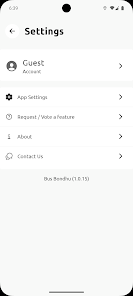
Engineered to run across a wide range of Android devices, BusBondhu keeps memory usage low by unloading inactive map tiles and session data, and network communication is encrypted to protect location-related traffic. Privacy controls let you decide whether to share location data for analytics or debugging, and authentication options include device biometrics to protect saved preferences and alerts. The help section provides quick tutorials, FAQs, and a direct feedback channel for reporting missing routes or incorrect ETAs; regular updates expand coverage and improve predictions based on operator data and user reports.
Save the stops you use most to surface ETAs instantly on the home screen, pin a service for one-tap visibility, and use the trip planner to preview alternative routes before leaving. If you often miss your stop, enable the last-stop notification for an audible reminder shortly before disembarkation. BusBondhu – Where is my bus? is built to be a reliable travel companion that reduces the friction of daily commuting, helps you make informed choices, and adapts to your routine over time.