



Simple SMS Messenger is a lightweight Android app designed for fast, reliable texting with a clean interface and essential features. It streamlines composing, reading, and organizing SMS/MMS messages while keeping battery and data use low. Ideal for users who want a straightforward, no-frills messaging experience on modern devices.
At its center, Simple SMS Messenger focuses on the fundamental tools people need for messaging: threaded conversations, quick reply, group messaging support, and MMS attachments. The app handles large message histories without becoming sluggish, and it includes a search function so you can find old texts or media rapidly. Developers prioritized stability and minimal permissions to reduce privacy concerns and background resource usage.
The interface is intentionally uncluttered. Conversations appear in a clear, list-based layout with readable fonts and a choice of light or dark themes. Tapping a thread opens messages in chronological order with timestamps and delivery indicators. Composing a new message is a single tap away from the main screen, and attaching photos or audio is presented as an unobtrusive panel inside the composer.
Simple SMS Messenger includes tools for organizing your inbox: archive, mark as unread, and delete operations are accessible from the thread menu. You can pin important conversations to the top and create custom labels or groups that help separate work and personal chats. Contacts sync with your phonebook so names and numbers display consistently across the app.
Privacy is a core consideration. The app requests only the permissions necessary to send and receive messages. It provides options to block numbers, mute threads, and disable message previews on the lock screen. For users who want extra discretion, Simple SMS Messenger can hide message content and prevent notifications from showing detailed text until the device is unlocked.
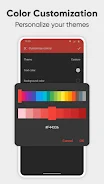
Although the app aims to stay simple, it offers meaningful customization. Choose notification sounds, vibration patterns, and LED behavior per contact or globally. Text size and bubble color can be adjusted to improve readability, and you can switch between compact and comfortable layout modes. These settings allow the app to adapt to different use habits while preserving its lightweight nature.
Efficiency is a selling point: Simple SMS Messenger runs smoothly on a wide range of Android devices, including older phones with limited memory. The app uses minimal background processing to preserve battery life and reduce data consumption. Regular updates address compatibility with new Android releases and SMS/MMS standards to keep message delivery reliable.
Getting started takes only minutes. Install the app, grant permission to access SMS and contacts, then set Simple SMS Messenger as your default messaging app if you want it to handle all messages. Import or allow access to your existing messages to continue your threads seamlessly. The onboarding process explains basic privacy controls and how to customize notifications.
Many users prefer Simple SMS Messenger when they want reliability without unnecessary extras. It offers the essential messaging functions in a responsive, privacy-conscious package. Whether you rely on SMS for everyday conversations, business confirmations, or two-factor authentication codes, the app is built to deliver messages promptly while leaving device resources available for other tasks.