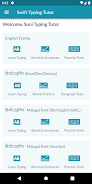
Looking for a straightforward way to boost your typing for exams, office work or study sessions? Soni Typing Tutor brings a structured desktop-style tutor to Android, offering lessons for both English and Hindi keyboards, practice drills, and measurable speed and accuracy feedback. The app is built around step-by-step exercises that introduce keys, finger placement and real typing drills that mimic the requirements of competitive and government tests. Whether you use the on-screen keyboard or pair a physical keyboard, the program aims to make progress visible and repeatable.
Dual-language support: Practice in English and Hindi, with support for popular Hindi fonts and multiple keyboard layouts so you can train in the script you need.
Extensive practice library: Hundreds of timed and untimed exercises let you move from basic keys to full-paragraph typing at your own pace.
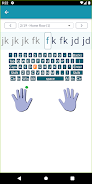
Visual guidance: An on-screen keyboard lights up keys and shows recommended finger positions so you build correct habits from the start.
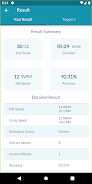
Performance metrics: Track gross and net words-per-minute, accuracy and error patterns to see where you improve or need more drills.
Multiple Hindi layouts: Use layouts such as Inscript and Remington variants to match the format used in many Indian typing exams.
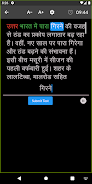
Font compatibility: Switch between common Hindi fonts so practice results display as they will in documents or exam interfaces.
ALT-code support: Enter Hindi via ALT codes when working with certain input setups, helpful for typing on a physical keyboard connected to your Android device.
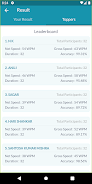
Ranking and comparison: Compare your speed and accuracy with peers to set targets and measure progress against other learners.
Exam-oriented drills: Exercises are designed around real-world tasks and the kinds of speed checks used by government and institutional tests.
Choose a language and layout: Pick English or Hindi and select the keyboard arrangement that matches your exam or typing environment.
Follow the lessons: Start with basic key drills shown on the on-screen keyboard and progress through structured lessons at your own pace.
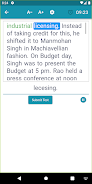
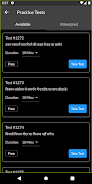
Practice and measure: Run sample tests, check your WPM and accuracy, and repeat weak sections until your scores improve.
Can I use a physical keyboard with the app?
Yes. You can attach a USB or Bluetooth keyboard to your device and practice using the same layouts and inputs available in the app.
Does the app prepare me for government typing tests?
The lessons and timed drills are tailored to common exam formats so you can build the speed and accuracy those tests require, though you should confirm exact rules for any specific exam.
Are the Hindi fonts and layouts interchangeable?
The app supports several Hindi fonts and layouts, letting you switch to the font or key arrangement you need for practice or for producing documents.
Unlike practicing on random text or a static keyboard chart, Soni Typing Tutor provides guided, measurable drills that mirror exam-style checks, making it a sensible pick for learners preparing for official tests or improving day-to-day typing; it suits students and professionals who want structured practice, though advanced users seeking in-depth analytics may need complementary tools.