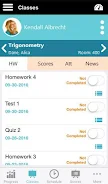
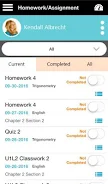
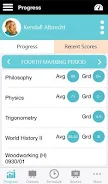
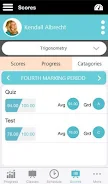

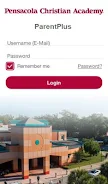
PCA Student is a mobile companion designed to keep Pensacola Christian Academy families connected to student information, and PCA Student places grades, schedules, attendance and school announcements into a single, secure app that is easy to use on phones and tablets. Whether you are a parent checking a weekly grade report or a student reviewing today's schedule, PCA Student provides a clear snapshot of academic standing and upcoming obligations without the need to visit campus.
The app centralizes core school data so parents and students can access grades, test scores, attendance records, discipline notes, homework assignments and calendar events from one interface. Push-style notifications alert households to important updates such as schedule changes or new announcements posted by the school. A consistent layout groups recent grades and missing assignments for quick review, while calendar integration highlights daily classes and school-wide events so families can plan around practices, exams and holidays.
Navigation focuses on simple, touch-friendly controls: a top-level menu directs users to Grades, Schedule, Attendance and Messages or Announcements. Within each area, filters and date-range selectors help you narrow results by term or class. For example, the Grades view supports drilling down from a semester summary to individual assignment details and teacher comments. The interface uses clear labels, large tappable targets and predictable back-navigation to reduce accidental taps and speed routine checks.
PCA Student supports academic progression tracking by preserving grade history across marking periods and displaying trends over time so families can spot steady improvement or sudden declines. The app summarizes current GPA or grading averages alongside recent assignment scores so parents and students can prioritize interventions. Report-style views make it straightforward to export or screenshot a student’s progress for meetings with teachers or for reference during conferences.
Users control which alerts they receive and how frequently the app notifies them, allowing customization by student, class or event type. Notification preferences help reduce noise while ensuring critical items—such as attendance irregularities or failing grades—appear promptly. Display options let families switch between condensed and expanded views of grade details to suit quick checks or in-depth reviews.
The visual design emphasizes high contrast text, clear typography and consistent spacing to make academic data readable at a glance. Accessibility options support larger text sizes and screen-reader compatibility to accommodate users with different needs. Colors are used sparingly to convey status (for example, missing assignment indicators versus completed work) and to avoid overwhelming the interface during quick inspections of schedules or grades.
PCA Student caches recent data so families can view the most recent grades, assignments and schedules when temporarily offline; full functionality requires an internet connection to sync changes and receive new announcements. The app is optimized for efficient network use, minimizing bandwidth while maintaining secure connections to the school’s information systems. Login credentials and student data are protected according to the school’s privacy policies.
Rather than gamified elements, the app uses simple challenge indicators to help families prioritize academic action: alerts highlight missing work, rising absences or downward grade trends and suggest follow-up steps such as contacting a teacher or reviewing class notes. These pragmatic prompts are intended to support timely interventions that keep students on track academically.
The PCA Student app is tailored for the Pensacola Christian Academy community and relies on school-provided information, so available content and features vary with the data the school shares. Access is generally limited to families and students associated with the academy; for those within the community, the app consolidates official school communications and record-keeping into a single mobile hub.
Pensacola Christian Academy supports learning through experienced faculty and a structured academic program with an emphasis on fundamentals and character development. The development and support team works with school administrators to maintain data accuracy, respect privacy standards and evolve the app to reflect the needs of families and educators at the academy.