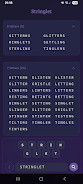

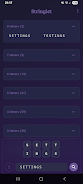
Stringlet is a fast, offline word-finding utility built for word-game fans, crossword solvers, and anyone who wants instant anagram assistance on their device. Stringlet runs locally and requires no internet connection: enter your available letters, include wildcards with ?, and the app returns every valid combination grouped by length so you can spot the highest-value words quickly. Its tile-based layout is designed for distraction-free lookups, with responsive controls that make experimenting with letter arrangements simple and immediate.
Stringlet focuses on core functionality rather than extras: it prioritizes speed, privacy, and a compact interface. Wildcard support using ? lets you include blank tiles or unknown letters to see potential matches. Results are presented instantly and grouped by word length so longer candidates appear at the top. The lightweight design keeps the screen uncluttered and emphasizes legibility, while everything runs locally to avoid sending your letters or searches to external servers.
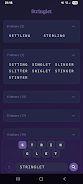
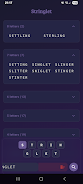
Enter letters in the tile row to start a search; use ? to represent blanks or wildcards. Tap a tile to lock that letter in place when you need a specific position held, or disable a tile to temporarily exclude a letter from the current search. Drag tiles left or right to reorder them and explore different permutations without retyping. As you adjust the tiles, the app recalculates matches on the spot and groups results by length for quick scanning. The result list is intended as a concise lookup tool rather than a learning resource, so it will not include definitions or usage examples.
Although Stringlet is not a game in the traditional sense, you can use it to structure practice and timed drills to develop skills. Set a personal timer on your device and challenge yourself to find the longest possible words from a given set; then use Stringlet to verify solutions and compare approaches. Increase difficulty by adding more letters, introducing multiple wildcards, or restricting usable letters to simulate tougher puzzles. These self-directed drills support measurable improvements in speed and pattern recognition without requiring accounts or online services.
The app emphasizes simple, tactile controls: tap to lock or disable, hold and drag to reorder. The tile interactions are designed to work with touchscreens and styluses, and the interface minimizes gestures so searches remain quick and predictable. Response times are fast because searches are performed locally, and the output layout is optimized for rapid scanning during timed practice or casual lookups. The straightforward interaction model reduces friction for new users while remaining efficient for experienced players.
Stringlet uses a minimalist visual approach focused on contrast and readability. Tiles are large enough to read at a glance and the results area groups words clearly by length. The compact, uncluttered design helps keep attention on the letters and matches rather than decorative elements. On smaller devices the layout adapts to present tiles and results without crowding, preserving usability across phone and tablet screens.
Because all processing happens on-device, Stringlet is suitable when you need an offline reference for practice, travel, or privacy-conscious usage. There is no cloud sync and no requirement to sign in, so your searches remain local. The app includes a built-in dictionary for matching words; it does not perform online lookups or fetch remote updates during searches, which keeps operations predictable and fast.
Replay value comes from the endless combinations of letters you can test and the different constraints you can impose on yourself. Use timed rounds to sharpen speed, lock certain letters to simulate board constraints from physical word games, or add wildcards to explore creative word construction. Because the tool is immediate and flexible, it supports repeated practice sessions that focus on different skills like finding long words, maximizing letter value, or working under time pressure.
Stringlet is intentionally focused: it finds valid words but does not provide definitions, example sentences, language lessons, or online dictionaries. It also does not include multiplayer, leaderboards, cloud backups, or live dictionary updates. If you need word meanings or cloud-based features, you will need a separate resource; Stringlet is designed to be a fast, private, and dependable helper for finding anagrams and options during play or study.