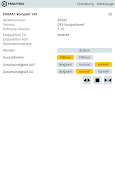
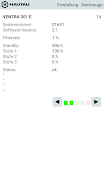
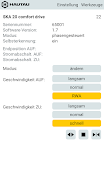
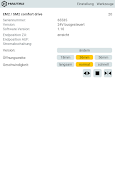
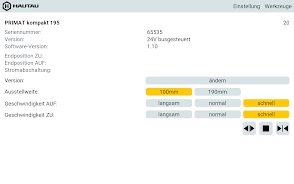
HAUTAU ConfigTool 3 is a professional configuration utility designed for commissioning, tuning, and diagnosing motorized window and door drives. This compact software streamlines parameter setup, provides real-time status monitoring, and accelerates troubleshooting for technicians and installers working with compatible HAUTAU control units.
HAUTAU ConfigTool 3 is built to simplify the commissioning process for automated window and door systems. The interface guides users through device detection, firmware checks, and parameter adjustment so installers can move from hardware setup to operational testing without guesswork. Tasks that previously required multiple tools are centralized into a single environment.
The application layout emphasizes clarity: a device tree on the left, a dynamic workspace in the center, and a status console at the bottom. Contextual help and inline hints minimize the learning curve while still exposing advanced parameters for experienced technicians. HAUTAU ConfigTool 3 balances accessibility with precision, letting users make small calibrations or full system adjustments as needed.
Connection options include direct USB and supported fieldbus protocols, depending on the target hardware. Once a device is detected the tool negotiates a secure session to prevent accidental writes. Communication diagnostics show link quality and transaction history so installers can verify that changes were applied successfully and monitor any transient issues during commissioning.
Predefined profiles speed up repetitive setups: users can create, save, and share configuration templates for identical window or door types. Template versioning and descriptive metadata make it easy to maintain consistent behavior across multiple sites. For complex projects, the tool supports exporting full configuration packages for backup or handover to facility managers.
Designed to run efficiently on standard service laptops, HAUTAU ConfigTool 3 keeps resource use low while offering responsive data visualization. The application supports a range of HAUTAU controllers and is updated periodically to add compatibility with newer firmware releases. Offline mode allows parameter staging before an on-site write operation, improving workflow in environments with restricted device access.
Safety features include write-protection options and staged commits that require confirmation before applying critical changes. All configuration changes are logged with timestamps and user IDs to create an audit trail for quality assurance and maintenance records. Error logs can be exported to common formats for further analysis or to support warranty claims.
Installers will find HAUTAU ConfigTool 3 helpful during initial commissioning, routine maintenance, and troubleshooting interventions. Facility managers benefit from consistent template application when retrofitting or expanding automated systems. Service teams can reduce return visits by diagnosing intermittent faults remotely and preparing corrective parameter changes before arriving on site.
Begin by installing the supplied driver package and connecting the target device. Use the discovery tool to identify hardware and review any firmware notices. Apply a template or configure parameters manually, then run a test cycle with the monitor engaged to validate behavior. For sites with multiple units, export a configuration package to replicate settings quickly across the installation.
With a focus on clarity, control, and consistency, HAUTAU ConfigTool 3 helps professionals manage motorized window and door systems more efficiently while preserving safety and documentation standards. Regular updates and template-driven workflows reduce downtime and standardize installations across projects.