


HD Video Player - All Formats is a versatile Android media player that supports a wide range of video codecs and containers, delivering smooth playback, subtitle handling, and advanced controls. It targets users who want a dependable, lightweight tool for local and network video playback with minimal setup required.
Designed for everyday use, HD Video Player - All Formats focuses on compatibility and performance. It recognizes common file types such as MP4, MKV, AVI, MOV, and more, while offering options for hardware acceleration and format fallback to ensure videos play without stutter on a broad set of devices.
The player handles high-resolution files efficiently and provides frame-accurate controls. Users can expect features like resume playback, adjustable playback speed, and loop or repeat modes. The seek bar responds to quick gestures, making navigation through long videos straightforward.
This app emphasizes extensive format coverage. It supports modern codecs and legacy formats, and will automatically choose the best decoding path—either software or hardware—based on device capability. That reduces compatibility headaches when moving content between phones, tablets, and external storage.
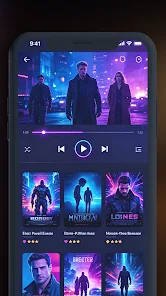
The interface is clean and minimal. A simple media browser lists local files with thumbnails and metadata, while playback screens show only essential controls until tapped. The design places common actions—play/pause, next, previous, and subtitle toggle—within thumb reach to speed typical workflows.
HD Video Player - All Formats includes flexible subtitle handling: automatic detection of internal and external subtitle files, manual sync adjustments, and support for multiple subtitle encodings. Audio track switching is available for multi-language files, and a built-in equalizer helps tune sound output to headphones or external speakers.
Efficient decoding and optional hardware acceleration keep power usage reasonable even during long playback sessions. Background playback and screen-off audio features are available to minimize battery drain while listening to lectures, podcasts, or music videos.
The app offers theme adjustments, customizable gesture controls (swipe to seek, swipe up/down for volume and brightness), and font sizing for subtitles. Accessibility options include high-contrast subtitle colors and support for external accessibility tools on Android.
The player limits network access to necessary streaming functions and requests only essential permissions, such as storage and local network access. Local file scanning is performed on-device to avoid sending personal media metadata to external servers.
HD Video Player - All Formats aims to combine broad format compatibility with a straightforward user experience. It balances advanced options for enthusiasts—like codec selection and streaming protocols—with simple defaults for casual viewers who just want reliable playback.
Installation is typical for Android apps: download, grant the requested permissions, and allow the app to scan for media. From there, users can tweak playback and network settings to match their usage patterns. Regular updates maintain codec support and improve stability across new Android versions.
For users who need a dependable media player without surplus features, HD Video Player - All Formats delivers practical controls, broad compatibility, and smooth performance across files and networks.