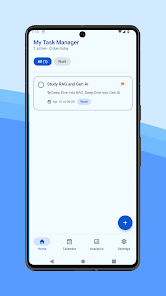
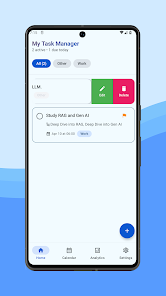
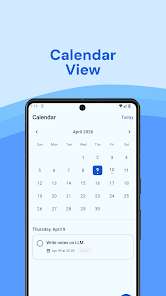
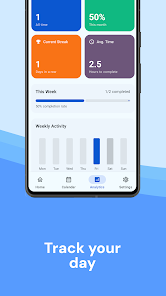
My Task Manager is a compact productivity app that organizes tasks, deadlines, and routines into a clear, actionable workflow. It combines list management, reminders, and calendar sync with simple controls to help users prioritize work and reduce distractions across devices.
My Task Manager focuses on streamlining everyday work and personal planning. It puts essential tools—task lists, due dates, priorities, and repeating items—within quick reach so you spend less time juggling apps and more time completing meaningful work. The app’s modular design fits both single users and small teams.
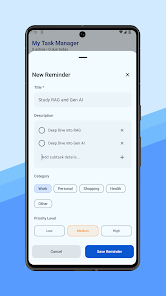
Setting up a task is immediate: type a short title, attach details if needed, and assign a due date or a repeating pattern. Tasks can be grouped into projects or tags, making it easy to switch context between work, home, and personal goals. Smart sorting and custom filters allow you to view the next actions, overdue items, or low-effort tasks when you need a quick win.
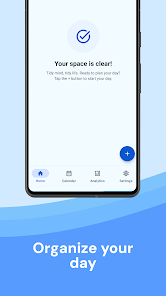
The interface balances clean typography with subtle color accents to guide attention. Lists are compact but readable, and key actions remain one tap away. Performance is responsive on mid-range devices; animations are modest to save battery while maintaining smooth transitions. Load times are minimal, even for extensive task lists.
Controls support large fonts and high-contrast modes. Voice input is available for hands-free task entry. Minimal onboarding screens help new users get productive quickly without overwhelming options.
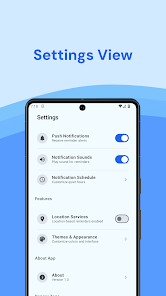
My Task Manager includes several settings to tailor the experience. Choose between list, board, or calendar views. Adjust notification intensity, set default task durations, and create custom templates for frequently repeated projects. Color-coded tags and priority flags help visually sort responsibilities at a glance.
Beyond individual use, the app supports lightweight collaboration. Share tasks or entire projects with collaborators, assign responsibilities, and leave comments on items. Calendar integration keeps meeting-related tasks aligned with your schedule, while export options allow backup to common formats for archiving or reporting.
Automatic cloud backup prevents data loss and enables seamless switching between phone and tablet. Two-way sync with popular calendar services ensures dates don’t drift, and optional third-party integrations expand functionality if you rely on other productivity tools.
Begin with a simple inbox: capture everything for a day, then routine-process the list into projects and priorities. Use the app’s smart filters to create a “Today” view and enable quiet hours to avoid notifications during focus time. If you use recurring routines, build templates to save setup time.
Users who choose My Task Manager tend to appreciate its balance between simplicity and depth. It avoids feature bloat while still offering powerful automation and organizational options. Whether you need a personal planner or a small-team taskboard, the app adapts to common workflows without extensive configuration.
Installation is straightforward and the initial free tier includes enough features for most users. Advanced sync and team features are available via subscription if your workflow requires cross-device collaboration or premium integrations. Trial periods and in-app tips make it easy to evaluate whether the app fits your daily routine.