
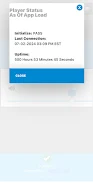
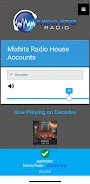
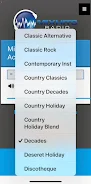


Mixhits Radio Control puts remote control of the Mixhits Radio iSTREAM Mini Media Player on your device. With this app you sign in with your assigned ID and PIN to access playback options, choose audio format and adjust volume from a single interface. The app also shows the currently playing artist and track title so staff can verify music without touching the player. Designed for businesses that subscribe to Mixhits Radio Business Music Service, Mixhits Radio Control simplifies on-site music management and keeps control quick and secure for retail, hospitality, or other public spaces.
⭐ Remote control for the Mixhits Radio iSTREAM Mini Media Player.
⭐ Select audio format and set playback volume directly from the app.
⭐ Displays current artist and track title for easy verification.
⭐ Secure login using your assigned ID and PIN to manage access.
⭐ Works with the Mixhits Radio Business Music Service for authorized subscribers.
✅ Streamlined interface lets users change settings without accessing the physical player.
✅ Mixhits Radio Control gives quick visual confirmation of what’s playing on-site.
✅ ID and PIN protection helps restrict access to authorized users only.
✅ Centralizes basic playback functions — format, volume and track info — in one place.
❎ Requires an active subscription to Mixhits Radio Business Music Service to function.
❎ You must have your assigned ID and PIN to log in, which adds an administrative step.
❎ Intended to control the Mixhits Radio iSTREAM Mini Media Player rather than to operate as a standalone streaming player.