
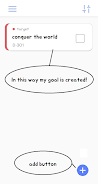
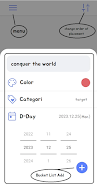

Cream Bucket puts a simple bucket-list into your pocket: Cream Bucket is a minimalist tool that helps you capture personal goals and daily items; Cream Bucket prioritizes fast, two-tap completion and lightweight logging so you can add items quickly and return to life without distraction.
Cream Bucket is built around the idea that list-keeping should never get in the way of doing. The interface focuses on a single job: let you record ambitions, errands, and small wins with as little friction as possible. Items are created with a compact input form and remain in the app until you explicitly remove them, so your lists persist between sessions while the app is installed on your device.
The core features of Cream Bucket emphasize speed and clarity. You can create and manage multiple entries using a lightweight input field that asks only for the essentials. Completing an entry takes two straightforward taps, which minimizes disruption when you want to mark progress. All data is stored locally on your device rather than in the cloud, and the app is intentionally small and focused so the experience stays distraction-free.
Interaction in Cream Bucket is deliberately simple: tap to add an item, type the text, and confirm. To mark a task as completed you use the two-tap completion flow described in the introduction, designed to prevent accidental changes while remaining faster than multi-step alternatives. Editing or removing an entry is handled via clear on-screen controls that keep gestures to a minimum so the app is predictable and easy to operate with one hand.
Rather than complex progression systems, Cream Bucket supports steady personal progress by keeping your goals visible and easy to update. The app encourages short, repeatable interactions so you can build momentum: add ideas as they come, mark small wins quickly, and keep a running record of completed items until you decide to clear them. This lightweight approach suits people who prefer incremental habit-building instead of structured gamified systems.
The visual design leans toward minimalism with clean typography and a straightforward layout that highlights list content. Customization is intentionally restrained to maintain clarity; controls and item text remain central while nonessential chrome is minimized. This design choice keeps the interface readable at a glance and reduces cognitive load when you’re capturing ideas on the go.
Cream Bucket operates fully offline because all entries are saved locally on your device. That means you can add, edit, and complete items without an internet connection. Be aware that uninstalling the app will remove all locally stored data, including any payment records associated with the app, so back up anything important outside the app if you plan to remove it.
The app emphasizes high-contrast text and large touch targets to make adding and completing items comfortable for a wide range of users. With minimal menus and a predictable control flow, Cream Bucket reduces the number of decisions required to manage lists, which benefits users who prefer straightforward navigation and minimal cognitive load. The compact interface also makes it practical for quick checks and updates across different daily contexts.
Cream Bucket offers lasting usefulness through everyday reuse rather than through levels or achievements. It fits routines such as planning weekly goals, tracking life projects, maintaining a wish list, or recording one-off ideas you want to return to. Because it is lightweight and quick to operate, the app naturally invites repeated use: the more you add and complete, the more value you get from a simple, focused tool.
To preserve speed and simplicity, Cream Bucket does not include advanced list management features like cloud synchronization, collaborative sharing, or complex tagging. If you uninstall the app, all locally saved items and any payment history inside the app will be deleted, so consider exporting or copying important information elsewhere before removal. The app is intentionally minimal by design; users seeking feature-rich productivity suites may find this app too pared down for some workflows.
Cream Bucket is well suited for users who want a no-frills, fast way to capture goals and small tasks without the overhead of bells and whistles. If you value clarity, low friction interactions, and reliable offline access to your lists, this app provides a compact, focused environment for making progress on personal objectives.