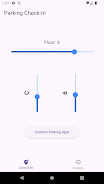
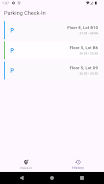
Parking Check-In is a compact, easy-to-use utility that helps you record the exact location of your vehicle so you can find it later without stress. Parking Check-In focuses on a simple manual workflow: enter a parking lot identifier and the basement floor or level where you left your car, save the entry, and recall it when you return. The app is designed for shoppers, commuters, event attendees, or anyone who frequently uses large surface lots and multi-level garages and wants a fast, reliable way to remember where they parked.
Parking Check-In uses a minimal set of features that are tightly focused on capture and recall. You can save a short lot number or name and select the floor or basement level from an easy-to-use input. Each entry is stamped with the time and stored locally so you can browse recent check-ins, edit or delete items, and add a short note to clarify landmarks or aisle numbers. The app keeps a running history of past entries so you can revisit previous locations, which is useful if you shop or commute to the same places repeatedly. The emphasis is on a clean, distraction-free experience without maps or live navigation, so the app remains lightweight and fast to open when you’re rushing.
The controls are deliberately simple: open the app, enter the lot identifier, choose the floor or level from a clear selector, and tap Save to record your parking spot. To retrieve a saved spot, open the app and the most recent entry appears first; you can also search or scroll through past check-ins by date or label. Editing an entry is a single tap to correct a floor or update a note; deleting is equally straightforward. The interface favors large touch targets and short text fields so it works smoothly while you’re on the move. No special account is required and all data stays on your device, so the app works the same whether you are online or offline.
Rather than a game-like progression, Parking Check-In offers practical progression in the form of a personal history: as you use the app your most frequent parking locations and recent entries become easy to access. This history lets you quickly reselect a previously used lot or floor if you park in the same place often, reducing the time needed to create a new entry. The app also supports simple sorting and a brief summary view that highlights your most recent or most used spots so retrieval is fast and predictable.
The visual design prioritizes clarity and legibility: high-contrast text, a limited palette, and readable fonts mean information is visible at a glance in bright outdoor lighting or dim indoor garages. Controls are spaced and sized for comfortable tapping, and the interface includes accessibility-friendly labels compatible with screen readers. Font size and contrast are chosen to support users with low vision, and the layout is predictable so it works well for a wide range of users, including those who prefer simpler, distraction-free apps.
Parking Check-In is fully functional without an internet connection because it relies on manual input and local storage. This makes it useful in underground garages or remote lots where connectivity is limited. The app offers basic customization like renaming entries and using short notes to indicate aisle, row, or landmark. Small personalization choices help you build a habit—save consistently and the app becomes a reliable day-to-day tool that shortens the time you spend searching for your car.
Parking Check-In is intentionally single-purpose: it does not include live GPS navigation, turn-by-turn directions, or map overlays. Because the workflow depends on manual check-ins, the app is most effective when you remember to save your spot immediately after parking. A practical tip is to make saving your entry part of your parking routine so the app can do the one thing it is built for—record and recall location details quickly. If you need integrated maps or guided walking directions, combine Parking Check-In with your preferred mapping app after you retrieve the saved lot information.
Users choose Parking Check-In because it reduces the time and frustration of searching for vehicles in large or multi-level parking facilities. The app’s straightforward controls, local history, and readable interface make it useful every time you park, whether you are visiting a busy mall, commuting to work, or attending events. Parking Check-In keeps the process simple and predictable so you spend less time retracing your steps and more time on what matters.