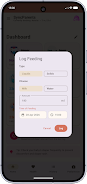
SyncParents is a shared baby-tracking app designed to help busy caregivers coordinate feeding, diaper changes and daily care in a single, synced timeline; this editor overview describes how SyncParents organizes tasks, how the controls work, what to expect from offline sync and the differences between the free and Pro tiers so you can decide whether it fits your family's routine.
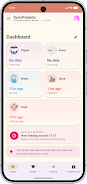
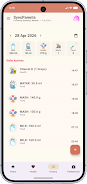
The core mechanic of SyncParents is a continuous timeline that records caregiving events with minimal attention: large one-tap buttons let you log breast or bottle feedings, diaper changes, sleep stretches and other routine events, and each entry is time-stamped with an optional note for context. Events are grouped by day and shift so the app feels predictable across morning, afternoon and night routines; this organization replaces guesswork by showing the most recent updates from any invited device in real time when online.
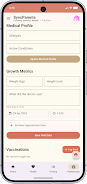
Controls are built for speed and dexterity: the main screen presents prominent action buttons, tap-to-edit entries, and short-cut gestures that reduce friction when you’re carrying an infant. A compact filter lets you show only certain event types or date ranges, and manual entry fields allow edits after the fact. Notification controls and optional reminders can be tuned to specific caregivers so handoffs become smoother without constant app checking.
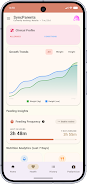
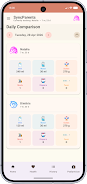
Progression in SyncParents is practical rather than gamified: value accumulates as an accurate history. Basic accounts store recent logs and a short recipe list, while Pro subscribers see extended history and simple analytics that turn individual logs into trend snapshots. Those insights highlight patterns such as feeding frequency or diaper-change intervals over a week, helping caregivers prepare for doctor visits or adjust schedules when routines shift.
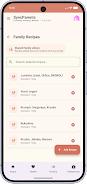
The app includes a family-friendly recipe library for quick meal ideas and preparation notes that invited members can access and annotate. Recipes are saved alongside daily logs so caregivers can reference meal plans during shift changes; this shared resource reduces duplicated effort and keeps instructions consistent when multiple people prepare meals for older siblings or plan solids as infants grow.
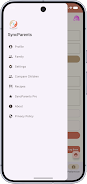
Visual and functional customization helps SyncParents fit different preferences: you can toggle visible activity types, adjust local units and labels, change font sizes for readability, and choose a compact or expanded timeline view. High-contrast text, clear icons and consistent spacing improve readability during quick interactions, and accessibility considerations extend to touch target sizes and simplified gestures for one-handed use.
Sync works in real time when devices are online and queues entries when connectivity is limited; items created offline are cached locally and pushed to other devices once a connection is available. The app prioritizes a consistent timeline view and includes simple conflict-resolution rules so the most recent confirmed entry appears for all invited members after synchronization completes, reducing confusion during overlapping shifts or spotty network coverage.
Privacy controls let you invite trusted family members and caregivers so records remain visible only to people you choose; shared timelines are private to invited accounts and there are no public leaderboards or social feeds. Free accounts provide core tracking and a limited recipe view, while a Pro subscription unlocks unlimited family syncing, extended history and the Smart Pro Insights that surface useful trends over time.
Replay value comes from routine: quick logging becomes a habit, reviewing history supports planning, and the shared library reduces duplicated work. Regular use turns SyncParents into a single source of truth for childcare coordination, making it easier to notice small shifts in feeding or sleep patterns and to hand off care reliably between partners or professional caregivers.
The app is designed to address common challenges like missed entries, overlapping logs and irregular schedules by offering edit history, filtered views and conflict resolution; built-in reminders and timestamped notes help teams resolve uncertainties, and the Pro analytics provide broader context when patterns change unexpectedly so caregivers can make informed adjustments.
The design favors clarity and predictability: a restrained color palette, readable typography and a tidy timeline limit visual clutter during quick checks. Controls are consistent across screens to reduce cognitive load, and small touches such as confirmable entry edits and clear activity labels help the app feel reliable during high-stress moments. Whether you try the free tier or explore the Pro trial, SyncParents aims to be a straightforward, privacy-first tool for modern caregiving routines.