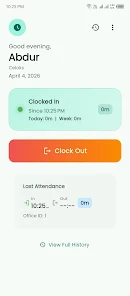
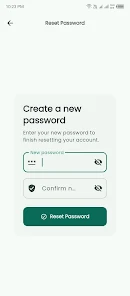
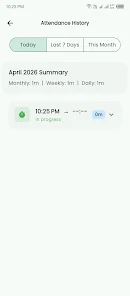
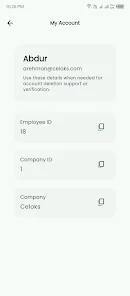
Time Sphere is a modern employee attendance system designed to help organizations track workforce presence accurately using GPS and secure cloud-backed technology. Time Sphere combines location-aware clock-in and clock-out with centralized record management so small businesses and large enterprises can reduce manual entry errors and maintain an auditable attendance trail. The app is intended for managers, HR teams, and employees who need a reliable, straightforward way to capture time and location for work shifts.
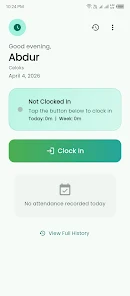
The core interaction model in Time Sphere focuses on simplicity: employees open the app at a permitted location and tap a clearly labeled clock-in or clock-out control. Behind that single tap the app validates the device's GPS coordinates against predefined geofences and timestamps the event before syncing it to a secure server. Administrators see these events appear in near real time on a centralized dashboard, enabling quick verification of shift starts and ends without manual reconciliation. The system also records metadata such as device identifier, approximate accuracy of the location fix, and network state to support later review.
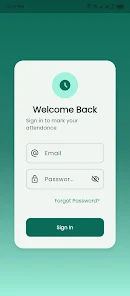
The user interface emphasizes large, accessible controls and clear status feedback so staff can complete attendance tasks quickly. Buttons for clocking in and out are prominent and labeled with concise descriptions; contextual messages explain why a clock action might be blocked, such as being outside a designated location or when GPS permission has not been granted. Settings pages allow employees to review their own recent punches and view basic attendance history, while administrators have separate views optimized for roster oversight and exception handling. The app follows common Android navigation patterns to reduce training time and support users of varying technical experience.
For administrators, progression means streamlined attendance management rather than game-style leveling. Time Sphere supports role-based access so supervisors can approve or reject exception requests, export attendance logs for payroll, and define geofence parameters for individual sites. Typical workflows include creating site locations, assigning teams to those locations, reviewing flagged entries that fall outside expected parameters, and exporting verified records as CSV for downstream payroll processing. These workflows are designed to scale from a single-location small business to multi-site organizations with distributed teams.
The visual design favors clarity: high-contrast text, simple icons, and an uncluttered layout that highlights the primary task of recording time. Location-based sites are presented as a straightforward list or map pin so managers can quickly understand which assets are active. The app’s structure is hierarchical in a practical sense—employee view, supervisor view, and administrator view—so users see information appropriate to their role without being overwhelmed by unrelated controls. This structure supports rapid navigation between daily attendance records and longer-term summaries.
Administrators can customize geofence radii, acceptable clock windows, and notification preferences to match operational needs, which gives organizations reason to return to the app for configuration tweaks as their requirements evolve. Because attendance is an ongoing business process, Time Sphere provides value through continuous use: daily clock-ins, periodic audits, and historical reporting. The app’s design encourages repeat interaction by making routine tasks fast and by surfacing exceptions that require human review, which helps keep records accurate over time.
Time Sphere is built to tolerate typical connectivity issues. When network access is limited the app caches clock events locally and attempts to sync automatically when a connection is restored, preserving timestamps and location context. GPS accuracy and cellular coverage remain limiting factors; the app reports location precision and flags entries with low-accuracy fixes so administrators can triage potential issues. Where necessary, administrators can configure fallback policies or manual verification workflows to handle situations where automated location validation is not possible.
Data security is a core consideration: attendance records are transmitted over encrypted channels and stored according to standard best practices to protect employee information. Time Sphere requests only the permissions needed for location and normal app operation and provides clear in-app explanations for those permissions. The design also takes accessibility into account by using readable fonts, clear contrast, and straightforward control labels to support users with varying visual and motor abilities. The app requires devices with location capabilities and compatible Android versions; administrators should verify device compatibility and GPS settings before deployment.
The primary constraints of Time Sphere are tied to GPS and network availability. Locations with poor satellite visibility or weak cellular data may produce imprecise coordinates or delayed syncs, and users must grant location permission for automated geofence checks to function. Organizations should plan for these limitations by documenting acceptable alternatives and training staff on how to request manual exceptions when necessary. With those considerations in place, Time Sphere can significantly reduce manual attendance work and improve the reliability of workforce time tracking.