

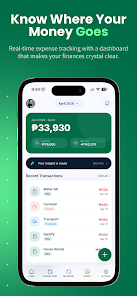

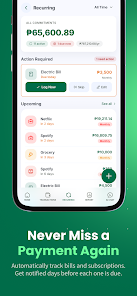
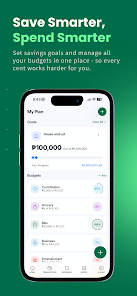
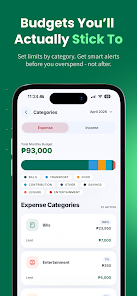
Monnei: Budget Expense Tracker is a practical mobile app that helps everyday users and small-business owners monitor spending, set budgets, and visualize cash flow with a clean, straightforward interface. The first screen gives you immediate context for current balances, upcoming bills and recent activity so you can take quick, informed actions without digging through menus. Monnei: Budget Expense Tracker emphasizes fast transaction entry, clear categorization and repeatable workflows so maintaining accurate records becomes a simple daily habit rather than a chore.
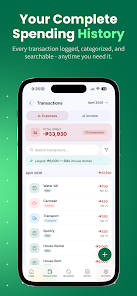
At its core Monnei: Budget Expense Tracker combines an at-a-glance dashboard with lightweight tools designed for real-world bookkeeping tasks. The main dashboard highlights account totals, pending transactions and budget progress, while separate views let you inspect transactions by day, week or month. Categories and custom tags let you organize entries around how you actually spend—groceries, utilities, client expenses—rather than forcing a rigid structure, and readable charts reveal longer-term trends without overwhelming detail.
The feature set covers routine needs without unnecessary complexity: add expense and income entries quickly for cash, card or transfers and edit them later as needed; schedule recurring items such as rent or subscription payments so your reports stay accurate; set category budgets with visible threshold alerts as you approach limits. A robust search and filter system helps you locate past entries by keyword, date range, account or tag, and CSV export makes it easy to move data into desktop spreadsheets for deeper analysis. The app also supports multiple accounts so household and small-business flows can be tracked separately.
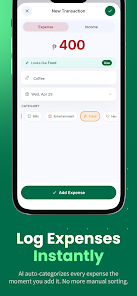
Controls are designed to be predictable and fast: a single-screen transaction flow minimizes taps—enter amount, pick a category, choose a date and add an optional note or attachment. Large touch targets and clear labels reduce input errors on small devices, and configurable quick-add templates remove repetitive typing for frequent transactions. Home screen widgets can display a compact balance readout or provide a one-tap entry action, letting you record expenses the moment they happen without opening the full app.
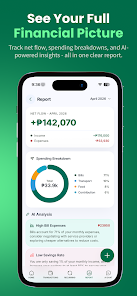
Rather than levels, progression in this app is measured by clearer month-to-month comparisons and measurable budget targets. You set category budgets and watch progress bars, receive timely warnings as you near limits and compare monthly totals with simple bar graphs. These mechanics create an implicit challenge system: meet your targets for a month, refine thresholds the next month, and use the timeline view to track behavior changes. Over time this iterative approach builds better spending habits and clearer financial decisions.
The visual design favors readability: high-contrast text, restrained color cues for categories and clear icons that avoid clutter. Compact pie charts break down category spending, bar charts compare totals across periods and a timeline view exposes peaks and dips so you can spot anomalies quickly. All visualization options include filters by account or tag and can be exported for tax or bookkeeping use, keeping the reporting focused and practical rather than decorative.
Personalization helps the app fit diverse workflows: rename or reorder categories to match how you think about money, assign colors for immediate recognition and save common filters for frequent reports. Widgets and saved quick-add templates reduce repetitive work for regular transactions, and account grouping lets you separate personal, household and small-business flows while keeping overall visibility. These options make it simple to tailor the app for day-to-day budgeting, freelance income tracking or straightforward small-business expense management.
Monnei is built to work across a wide range of Android devices and supports offline use as a core principle: transaction histories are available locally and changes are cached so you can add or edit entries without a steady connection. When connectivity returns, optional encrypted backup or cloud sync updates remote copies. The interface respects accessibility needs with readable fonts, logical navigation and sufficient contrast so platform accessibility tools function smoothly.
Privacy is prioritized: data is stored locally by default and remote backups are encrypted and optional. App protection options such as PIN or fingerprint unlock prevent casual access, and export features only send data to third-party services if you explicitly enable them. These safeguards aim to keep your financial records under your control while still offering convenient, secure backup choices when you need them.
Getting started is straightforward: install the app, choose local mode or create an account for optional sync, add primary accounts like cash, bank and card, and import historical entries if available. Start with a single budget for a core category and refine targets as you learn your spending patterns. Over weeks and months the combination of simple daily entry, clear visual reports and adjustable budgets helps strengthen money management routines and makes Monnei: Budget Expense Tracker a practical companion for ongoing household, freelance or small-business finance tracking.





















