
MT Manager is a versatile Android utility that combines file management, APK inspection and text editing into a single package. Designed for power users and developers, it provides direct access to system files, archive handling, and in-app resource browsing while keeping an approachable interface for routine tasks and quick edits.
MT Manager targets users who need more than a basic file explorer. It blends a reliable file browser with editing tools that are useful for app troubleshooting, development workflows, and advanced device maintenance. Whether you want to inspect an app package or quickly edit a configuration file, the app keeps those tools within reach.
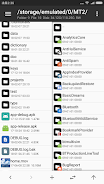
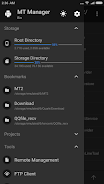
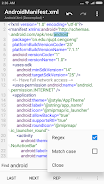
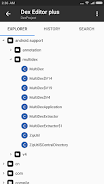
The interface divides tasks into a navigation pane and a content view. Browse folders or tap an APK to open its internal structure. The editor loads files directly and highlights searchable text. File transfers run in the background so you can continue working while operations complete. When root access is available and granted, the app can access protected directories to support advanced maintenance tasks.
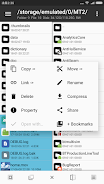
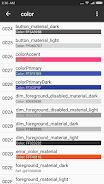
MT Manager includes utilities that speed up common developer chores. The resource viewer reveals manifest entries and resource files. The editor handles large files efficiently and provides character encoding choices. Integrated archive tools make it simple to compress or expand packages, and file permission settings are accessible through an intuitive dialog for users who manage system-level content.
The design focuses on clarity and function: clear icons, multi-column lists, and quick-action menus reduce friction. Performance is tuned for mobile hardware; file operations use optimized I/O routines to complete transfers while minimizing interruptions. The editor balances responsiveness with feature depth so that scrolling and typing remain smooth even on mid-range devices.
Users can adjust view modes, sort order and default behaviors to match their workflow. Favorites and quick-access entries simplify navigation to often-used folders. For developers, being able to preview an app package without unpacking it streamlines debugging and resource checks. The app’s options allow tailoring how archives and text files are handled to suit individual preferences.
Advanced users appreciate how MT Manager merges multiple utilities into a single app that reduces context switching. The ability to inspect APK internals, edit resources, and perform file operations without leaving the environment speeds many technical tasks. It also works well as a portable toolkit for troubleshooting devices or preparing app builds on the go.
To begin, install the APK from a trusted source, grant the required permissions, and explore a familiar folder to test file operations. Open an unimportant APK or a sample text file to try the editor and archive tools. Spend a few minutes in the settings to set your preferred view and default behaviors so the app fits your daily routine.
MT Manager offers a compact, capable environment for anyone who needs direct control over files and app packages on Android. With careful use and routine backups, it becomes a productive addition to a mobile development or advanced maintenance toolkit.