ABA Cloud is a secure, cloud-based practice management app designed to streamline data collection, scheduling, and reporting for behavior analysts and therapy teams. ABA Cloud brings client records, session notes, billing tools and progress visualization together in one accessible platform so clinics and solo practitioners can reduce administrative tasks and focus on clinical decision-making. The app supports desktop and mobile workflows for use in clinics, schools, and community settings.
The core feature set centers on efficient session documentation and reliable record keeping. Real-time session data entry supports event counting, interval sampling, duration and latency measures with automatic timestamps. Customizable treatment plans let clinicians map program hierarchies, target skills, and mastery criteria so objective progress can be tracked over time. Appointment management and integrated invoicing are included to reduce duplicate work, and export options such as PDF and CSV make it straightforward to share progress notes with families, funders, or school teams.
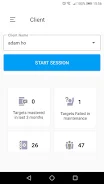
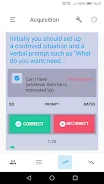
The interface emphasizes clarity and fast controls. Dashboards show upcoming appointments, recent notes, and outstanding tasks with color-coded timelines and filter controls to locate client records quickly. Data entry screens use large, touch-friendly buttons and quick-select options for common behaviors and interventions to speed recording on mobile devices. Visual components such as progress graphs and cumulative records are designed for legibility, with adjustable time scales and contrast settings that support clinicians who prefer simplified displays or higher contrast for accessibility.
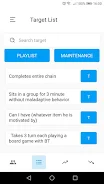
Accurate measurement is central to the app experience. During sessions clinicians can choose observation methods appropriate to the target behavior and the intervention plan; the system records raw entries, computes response rates, and synthesizes those data into mastery summaries without manual calculation. Progression systems are reflected in program libraries and goal hierarchies, so teams can define acquisition steps, set mastery criteria, and monitor learners as they move from one objective to the next. Built-in charts and tables help teams identify trends, plateaus, or the need to adjust teaching strategies.
Reporting tools include preformatted templates for progress notes, program summaries, and insurance-ready documentation, along with a report builder that combines narrative text, objective data tables, and embedded graphs. Templates are customizable so each practice can maintain consistent documentation styles across therapists. Import wizards simplify bringing legacy spreadsheets and existing assessments into the system, while export options preserve data portability for audits or multi-agency collaboration.
Security features protect sensitive client information through encrypted storage and secure transmission protocols. Administrators can configure role-based access permissions, enforce two-factor authentication, and review audit logs to maintain governance and comply with local professional standards. Privacy controls and activity tracking are built into the platform to help teams meet regulatory requirements and demonstrate responsible data stewardship during reviews or accreditation processes.
To fit into existing clinic workflows, the platform offers calendar sync, billing integrations, and API support for third-party analytics or practice management systems. These interoperability options reduce duplicate entry and help practices maintain consistent records across tools. Mobile offline capture is available so notes and observations can be recorded during home visits or community sessions and synchronized automatically when a connection is restored, preserving continuity of care and minimizing data loss.
Supervisors can review session notes, sign reports, and leave annotations directly within client files, supporting efficient remote supervision and documentation of clinical oversight. Shared program libraries and templates promote consistency across team members, while messaging and task assignment tools help track follow-up items until completion. The app also includes help articles and in-app guidance to support day-to-day usability for staff with varying levels of technical experience.
New users begin with a guided setup that walks through client enrollment, program creation, and staff permissions; templates and import wizards accelerate initial configuration. Onboarding resources range from step-by-step guides to scheduled training sessions tailored to clinic size and needs. For practices requiring additional configuration, support options include customization services and priority technical assistance to align the system with specific clinical workflows. ABA Cloud continues to receive regular updates driven by clinician feedback to refine analytics, accessibility, and integration options.
By combining practical documentation tools, secure architecture, and flexible integrations, ABA Cloud aims to reduce administrative burden, improve data fidelity, and support collaborative clinical decision-making for behavior analysts and therapy teams.