Speech Services by Google provides high-quality text-to-speech capabilities and voice models for Android devices, enabling apps to speak notifications, read text aloud, and support accessibility. It acts as a system-level engine that third-party apps and services can use to deliver clear, natural-sounding audio with multiple languages and voice options.
At its core, Speech Services by Google converts written text into spoken words across the operating system and installed apps. Unlike single-purpose readers, it functions as a shared speech engine: media players, e-book apps, navigation tools, screen readers, and virtual assistants can all tap into its voices and language packs. That central role makes it an important utility for accessibility and multitasking on phones and tablets.
When an app needs spoken output, it sends a text string and configuration options (language, pitch, speed) to the speech engine. Speech Services by Google processes the request, selects the appropriate voice model, and synthesizes audio either locally or with cloud assistance, depending on available resources and settings. For routine tasks such as reading messages or providing turn-by-turn directions, the perceptible delay is minimal and the pronouncing clarity is reliable.
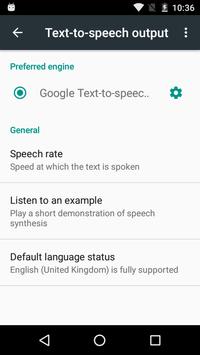
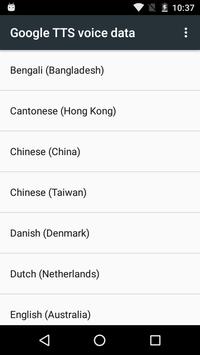
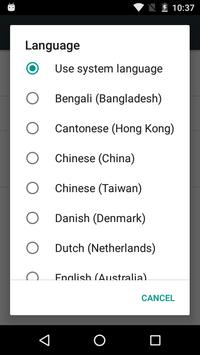
Settings allow users to tailor how speech behaves across the device. From the Android accessibility menu you can select Speech Services by Google as the preferred engine, download specific language packs for offline use, and change parameters like speaking rate or pitch. Some apps expose in-app controls for voice selection and speech speed, giving finer-grain control without diving into system menus.
Performance is generally efficient: modern devices handle local synthesis without significant CPU or battery drain. Larger or cloud-based voice models may require network access but can deliver more natural intonation. The settings interface is straightforward, showing installed voices and data size. When multiple speech engines are present, Speech Services by Google integrates cleanly, letting users test samples and switch back quickly if desired.
Speech Services by Google processes text to create audio, and depending on settings, some synthesis can occur on Google servers. Users who are privacy-conscious should review voice data settings and prefer offline downloads for sensitive content. The app follows platform permissions and does not require access to more data than necessary to generate speech.
To start using Speech Services by Google, install or update it from the Play Store, then open Android settings > Accessibility or Text-to-Speech output to select it as your engine. Download any needed language packs and test voices using the built-in sample. Developers can consult the Android TextToSpeech API to add spoken output to applications quickly.
For users who need reachable, consistent speech across many apps, Speech Services by Google remains a practical choice. It balances voice quality, device integration, and configurable behavior—making spoken interactions smoother for both everyday tasks and specialized accessibility needs.