Spidertracks provides pilots and operators with dependable real-time flight tracking, emergency alerting, and flight history tools in a compact mobile interface. The Spidertracks mobile app links approved aircraft trackers to a secure cloud service for live position updates, crew messaging, and automated safety alerts, so ground teams can monitor operations and support crews with timely information. Many organizations use Spidertracks for routine oversight, incident response, and post-flight analysis because it keeps position history intact even when connectivity is intermittent.
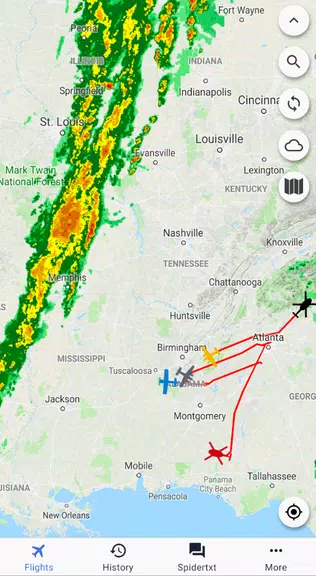
The app continuously reports positions and presents a timeline of recorded locations for each flight, with configurable reporting intervals to balance battery life and fidelity. Live tracks appear on a layered map view that shows recent breadcrumbs and the current trajectory, while an events feed highlights SOS activations, geofence breaches, low-battery warnings, and custom alert types. Predictive estimated times of arrival and configurable notification rules help dispatchers anticipate issues, and the platform supports exportable reports for compliance and review.
Spidertracks pairs with certified tracking hardware to send location, altitude and movement telemetry to a cloud platform where authorised users can subscribe to individual aircraft feeds. The app acts as both a controller and a viewer: users acknowledge alerts, change subscription settings, and exchange short text-style messages with crew. When a device loses connectivity, data is buffered locally and uploaded automatically when service resumes, which preserves the continuity of flight history for debriefing or investigations.
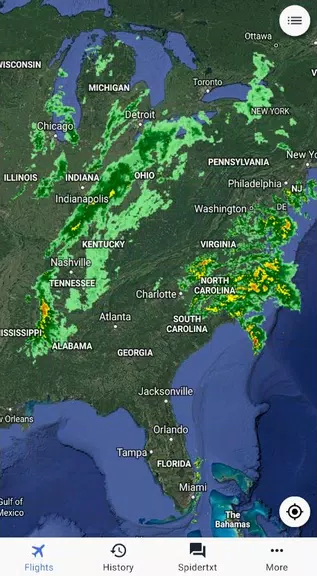
The user interface is designed for clear, touch-first interactions. Map gestures allow pinch-to-zoom, tap-to-focus on an asset, and swipe-through event details without cluttering the main view. Layered map styling distinguishes live tracks, replay trails, and geofence boundaries so users can interpret status at a glance. The layout favours readability with contrast-aware map tiles and concise iconography to make rapid decisions easier during high-pressure situations.
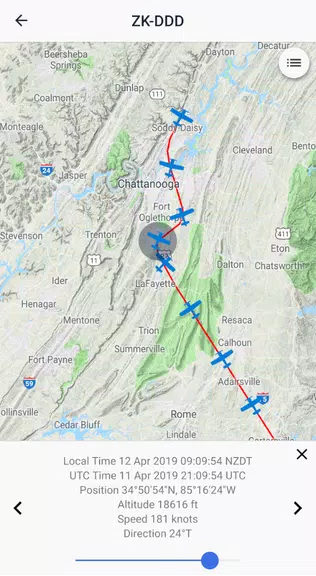
Flight replay is central to operational review. The timeline view lets operators scrub through a recorded flight to examine route choices and decision points, and replay tools include adjustable playback speed to focus on critical segments. Onboarding and setup follow a clear progression: device pairing, permission assignments, and watcher group creation guide administrators through a repeatable flow so teams reach an operational state quickly. Progression is task-oriented rather than gamified, helping organizations standardise monitoring procedures.
Administrators can tailor alert thresholds, create watcher groups, and assign roles that limit access to sensitive information. The app supports integrations with fleet management and maintenance systems through APIs and exportable CSV or KML reports for off-line analysis. Audit trails record who acknowledged alerts or edited settings, enabling transparent reviews and governance for safety teams and compliance officers.
On Android devices Spidertracks is optimized to conserve battery and maintain responsiveness; map tiles are cached for offline viewing and background activity is limited to essential uploads and alert handling. The app supports a broad range of Android versions and screen sizes and is engineered to provide near-real-time updates when paired with supported trackers, even across remote areas with intermittent cellular coverage. Efficient map rendering and selective data sync help minimize data usage while preserving essential history.
The design emphasises clarity for diverse operator needs: readable labels, adjustable zoom levels, and a simplified event feed let users scan critical information quickly. The app supports larger text and a layout that reduces visual clutter, which helps users who require clearer interfaces during rapid decision-making. Messaging and alert acknowledgements are concise to limit interaction time while preserving a strong operational record.
Operational environments present common challenges such as signal loss, battery constraints, and firmware mismatches on paired devices. Spidertracks addresses these through buffered uploads, configurable reporting intervals, and clear guidance on keeping tracker firmware current. For best results configure sensible reporting intervals, organise watcher groups to route alerts to the right people, and use flight replay routinely during debriefs to identify trends or recurring deviations. These practices help reduce false alarms and improve response times without adding unnecessary workload.
Spidertracks remains a pragmatic tool for teams that require continuous oversight and a secure safety net for flights, combining reliable tracking, structured alerts, and exportable histories to support everyday operations and incident review.