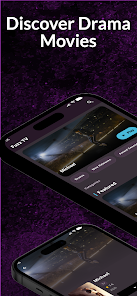

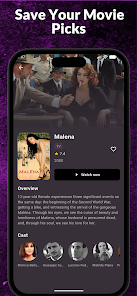
Fuzz TV brings live channels, on-demand shows and curated playlists to Android devices with an intuitive interface and low-data playback options. Fuzz TV offers easy channel navigation, customizable favorites, and a tidy program guide that helps users find content quickly whether streaming over Wi‑Fi or mobile networks.
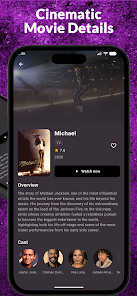
The app combines live television streams with a growing library of on-demand content. Users can browse linear channels, access catch-up programs, and build personal playlists. A built-in program guide displays schedules, descriptions, and start times. Playback controls include adaptive bitrate streaming, manual quality selection, and closed-caption support for accessibility.
Fuzz TV uses a clean, card-based layout that surfaces current broadcasts and trending titles on the home screen. Navigation is organized into tabs for Live, On-Demand, Guide, and Favorites, with a persistent search bar for quick lookups. Channel logos and thumbnails load progressively to preserve responsiveness on slower connections.
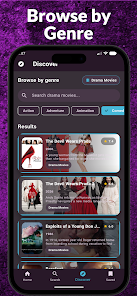
Search results are grouped by type—channels, shows, or clips—making it easier to locate a specific program. Filter options allow sorting by genre, language, or popularity. A recommendation row adapts to viewing habits to surface similar shows, while curated editorial collections highlight seasonal content and new releases.
Adaptive streaming keeps interruptions to a minimum by adjusting video quality in real time based on connection strength. Low-latency modes reduce delay on live events, and an optional low-data mode limits resolution to conserve mobile data. Background buffering and efficient cache management reduce rebuffering on flaky networks.
Account features let viewers mark favorites, resume playback across devices, and set up profiles for household members. Parental controls and PIN protection restrict access to mature content. Fuzz TV supports multiple user profiles so each person can maintain their own watchlist and viewing history.
The app runs on a wide range of Android devices, including phones, tablets, and Android TV boxes. Casting support extends playback to compatible smart TVs and streaming dongles. System requirements are modest, and the installer includes compatibility checks to prevent installation on unsupported versions of Android.
While designed for streaming, the app includes options to limit high-resolution playback to Wi‑Fi and to prefetch small program segments for smoother viewing. Some content may be available for offline download where licensing permits, enabling watching without an active connection and useful for travel or limited data plans.
Playback controls are intuitive: scrubbing, chapter markers, and speed adjustment appear during playback. Subtitle options, multiple audio tracks, and menu localization make the app accessible to an international audience. UI scaling and focus indicators improve usability on larger screens and remote controls.
The service typically offers a mix of ad-supported free channels and premium tiers for ad-free or expanded content. Account management screens display subscription details, billing options, and data usage insights. Privacy settings control tracking and personalization levels, and the app provides in-app links to the full privacy policy.
Downloading and setting up Fuzz TV is straightforward: install from a trusted app store, grant required permissions, and create an account or continue as a guest. The initial walkthrough highlights key sections like Live and Guide and suggests adding favorite channels. For best results, enable automatic updates and confirm casting devices are on the same network.
Fuzz TV is positioned to be a flexible streaming companion for users who want a blend of live channels and on-demand content with thoughtful playback controls and device compatibility. Its focused feature set and straightforward navigation make it suitable for everyday viewing on Android devices.