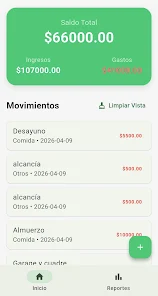
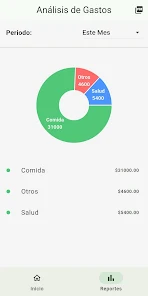
ZenMoney - Control de gastos helps you track spending, set budgets and visualize finances with clear charts and automated categorization. Designed for daily expense control, the app centralizes receipts, recurring bills, and savings goals so you can see where money goes and plan smarter financial decisions.
ZenMoney - Control de gastos is a personal finance tool focused on simplicity and actionable insights. It combines manual entry and automated imports to give a complete picture of your cash flow. The interface emphasizes immediate clarity: recent transactions, remaining budget, and upcoming payments are visible at a glance.
The app provides a compact set of features built around routine money management. Key capabilities include:
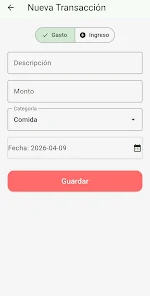
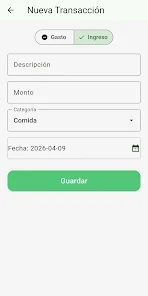
The layout is designed for speed. Adding a new transaction takes a couple of taps and auto-complete speeds input for frequent purchases. Color-coded categories and compact graphs make comparisons straightforward. ZenMoney's navigation uses simple tabs: Overview, Transactions, Budgets, and Settings.
ZenMoney - Control de gastos supports cloud sync across multiple devices, so households can share a consolidated account view. Offline entry is preserved locally and synced when connectivity returns. Security options include PIN and biometric unlock to protect sensitive data.
Start the month by setting category budgets and entering fixed monthly bills. Throughout the day, log purchases or let the app import bank transactions where supported. Weekly reviews highlight budget overruns and suggest adjustments. At month-end, export a report to archive or analyze long-term trends.
Advanced users can fine-tune the app by creating custom categories, defining income streams, and marking transactions as personal or shared. Multi-currency handling and manual exchange rates make ZenMoney suitable for travelers or accounts held in different currencies.
Performance is lightweight: the app runs smoothly on mid-range devices without significant battery drain. Background sync is optimized to minimize data usage. Crash reports and updates are handled regularly to keep the experience stable.
This app suits people who want simple but comprehensive control over everyday finances. Freelancers, small households and budget-conscious individuals will appreciate the clarity of categorized spending and the ability to set realistic saving targets. For users who prefer bank-level automation, integration support reduces manual effort.
Download and complete initial setup by creating an account or using local mode. Configure categories, link supported bank accounts if desired, and enable biometric locking for quick but secure access. The initial setup takes a few minutes and the app provides guided prompts for common tasks.
ZenMoney - Control de gastos balances practical tools and an unobtrusive interface to help users regain control over their finances. With clear visual reports, straightforward budgeting tools and secure synchronization, it fits into a daily routine without adding complexity. Try it for a billing cycle to see immediate benefits and refine habits based on the insights it reveals.