
Qualidade Btech is a compact quality-management tool designed to help technicians and managers capture inspection data, track nonconformities, and generate clear reports. With an emphasis on workflow efficiency, it streamlines audits, simplifies checklist creation, and keeps quality records centralized for easier decision-making and compliance tracking.
Qualidade Btech targets factories, maintenance teams, and field service groups that need a lightweight digital system for quality control. The app replaces paper forms with structured inputs, offers offline data capture, and supports photo and annotation attachments. Its core purpose is to reduce administrative friction while improving traceability across inspection cycles.
Using Qualidade Btech typically begins with building a checklist tailored to a product line or process. Inspectors follow the checklist on a mobile device, marking items as pass, fail, or not applicable. When a fault is detected, the user records details and captures photos. After syncing, managers can view consolidated dashboards and take next steps—assigning remedial tasks or scheduling follow-ups.
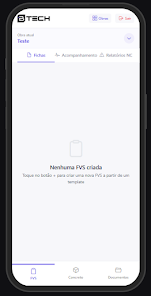
The interface focuses on clarity: a minimalist layout, clear labels, and large touch targets for quick data entry. The learning curve is short; new users can complete their first inspection within minutes. Navigation centers on the current checklist, with quick access to recent records and saved templates. Icons and color cues highlight status changes to help teams triage issues fast.
Qualidade Btech provides flexible customization to adapt to differing quality standards. Administrators can define fields, set required answers, and determine which users can edit templates. Severity scales and priority tags are configurable, enabling the app to mirror existing internal procedures rather than forcing a one-size-fits-all approach.
Data export options let organizations integrate records with spreadsheets or enterprise systems. Reports include timestamps, operator IDs, and attached media for audit trails. The app stores synchronized data in a centralized repository that supports search and basic filtering—helpful for trend analysis and recurring problem identification.
Performance is optimized for mid-range devices, with fast form rendering and low memory overhead. Offline capability is robust: entries are queued locally and uploaded automatically. Sync conflicts are handled conservatively to avoid data loss, prompting the user when manual reconciliation is needed.
Start by converting your most common paper checklist into a template and run a pilot with a small team. Use photo attachments liberally to clarify defects. Set clear naming conventions for templates and reports to reduce confusion. Establish a sync routine at shift changes to keep centralized data current.
Qualidade Btech stands out for its simplicity and focus on inspection workflows. It doesn’t overwhelm users with unnecessary features; instead, it provides the essentials needed to maintain consistent quality records. The app helps teams reduce paperwork, speed up corrective actions, and improve visibility into product or process health.
Installation is straightforward through standard app distribution channels. After signing up, allocate a short training session to cover template creation and the sync process. With minimal setup, the app can start delivering measurable reductions in admin time and clearer documentation for quality managers.