
Epic Games is a mobile client that brings the company's game store, library management, and social features to Android devices, letting users browse titles, install updates, and access cross-platform purchases. It streamlines downloads and account management while delivering news, offers, and a hub for friends and party coordination.
The Epic Games app combines a curated storefront with tools for managing your game collection and connecting with other players. Key capabilities include downloadable game installers, automatic update management, exclusive offers, and easy access to launcher-only titles. Integrated notifications keep you informed about time-limited promotions, patch notes, and upcoming drops.
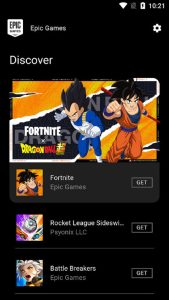
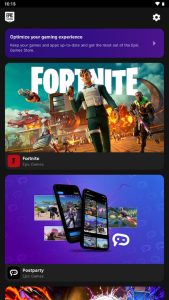
The app's layout focuses on quick discovery and minimal friction. A home feed highlights featured releases and free game giveaways, while tabs separate your library, store, and social sections. Search functionality is responsive, and filters let you sort by genre, price, or platform compatibility. Visual previews and concise descriptions help you decide before installing.
Library tools in Epic Games prioritize clarity: installed titles are grouped separately from owned but uninstalled games, and download progress displays prominently. Purchase flow is straightforward, supporting multiple payment methods and regional pricing where available. Receipts and order history are accessible from the account section for easy reference.
Account controls are central to the experience. Epic Games requires sign-in to access purchases and cloud saves; two-factor authentication can be enabled for extra protection. Cross-platform synchronization ensures progress and purchases are consistent between mobile, console, and PC when supported, so you can pick up where you left off on another device.
Performance depends on device hardware and connection speed. The client is optimized to minimize background resource use while downloading or updating games, but larger installations benefit from Wi‑Fi and ample free storage. Compatibility notes appear on store pages to help you confirm whether a title will run or require additional hardware.
Setting up the Epic Games app is quick. Create or sign in to an Epic account, grant necessary permissions for storage and notifications, and browse the curated welcome offers. After installing a game, use the settings menu to configure download preferences, enable mobile notifications, and review privacy options.
To get the most from the app, use scheduled downloads for off-peak hours, enable two-factor authentication to protect your account, and pin frequently played titles for quick access. Keep an eye on the free game giveaways and event announcements to expand your library without extra cost. If storage is limited, uninstall games you rarely play and rely on cloud-linked purchases to reinstall later.
Epic Games continues to evolve its mobile client with feature updates and performance improvements. For players who want a single place to manage purchases, discover new releases, and stay connected with friends across platforms, the app provides a compact, practical toolkit for on-the-go game management and timely notifications about content and deals.