
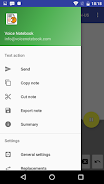
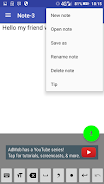
Voice-driven note-taking tools find a practical home on Android with Voice Notebook. This app combines speech recognition, basic text editing and cloud connectivity into a single workspace where you can record ideas, transcribe meetings or keep a running list of reminders. The interface focuses on quick capture and later organization, letting you switch between typing and speaking without juggling different apps. Whether you want a clean transcript of a conversation or a short memo read back to you, Voice Notebook provides a straightforward workflow that fits everyday note-taking.
Accurate speech-to-text: The app converts spoken words into editable text with clear punctuation handling, so transcripts need minimal cleanup after recording.
Offline recognition: You can dictate without a network connection, making the app useful in transit or low-coverage areas while maintaining privacy for local notes.
Cloud sync and preview: Notes can be saved locally or uploaded to cloud storage services and previewed from within the app, which keeps records accessible across devices.
Custom dictionary and shortcuts: Add bespoke terms and punctuation rules to improve recognition for names, technical terms or frequent phrases you use.
Text-to-speech playback: The app uses your device's TTS engine to read notes aloud, useful for proofreading or listening back while doing other tasks.
Quick notes: Short voice memos captured on the fly for shopping lists, reminders or single-line ideas that you can tag and find later.
Long-form transcripts: Extended recordings for interviews, lectures or brainstorming sessions that produce multi-paragraph output for editing.
Template-driven entries: Structured note templates let you create repeatable forms such as meeting minutes or daily logs with voice or keyboard input.
Multi-language entries: Switch languages within the same project and keep bilingual text; useful for learners or multilingual environments.
Set up a custom dictionary: Preload names, industry terms or acronyms that the recognizer often mishears to reduce manual corrections.
Use keywords to trigger formatting: Record common phrases that the app can interpret as commands, like inserting line breaks or headings to speed up editing.
Pair with cloud backups: Enable syncing if you want the extra layer of off-device storage and quick previews from other apps or web access.
Can I use the voice recognition without an internet connection?
Yes. The app supports offline speech processing so you can dictate when you have no network. Some advanced models may be limited while offline, but basic transcription works locally.
How does cloud syncing work and is it secure?
Notes can be uploaded to popular cloud services for backup and preview. Security depends on the cloud provider you link; use password protection and the provider's encryption options for sensitive content.
Does the app handle multiple languages in one note?
It supports dictation in several languages and you can switch between them or keep bilingual content. Accuracy improves if you set the active language to match your speech for each session.
Can I listen to my notes instead of reading them?
Yes. The app uses the device's text-to-speech engine to play back notes, which is handy for proofreading or catching errors while away from the screen.
Voice Notebook is a practical choice when you need reliable dictation combined with simple organization and optional cloud backup. If you regularly capture voice ideas, transcribe meetings or prefer listening to your notes, this app streamlines those tasks with useful tools and offline support. Give it a try if you want a focused voice-first notebook that keeps the editing and sync options within easy reach.