TForwarder - message forwarder is a lightweight Android utility that helps you move conversations and media between chats and channels with minimal friction. The app focuses on practical forwarding tasks: selecting multiple messages, applying simple filters, keeping or removing sender metadata, and delivering content to one or several destinations while preserving message order and attachments. Designed for everyday productivity, TForwarder - message forwarder reduces repetitive copy‑and‑paste steps and gives you clear controls over what actually gets forwarded.
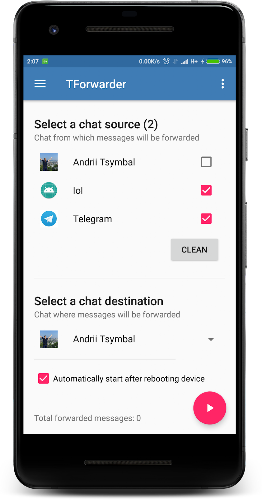
At its core, the app provides a selection-driven workflow that feels familiar to anyone who uses mobile messaging apps. You can long-press to enter multi-select mode, tap individual messages to add or remove them from the batch, or use a range selection gesture to capture contiguous message blocks. Filters let you include or exclude messages by keyword, sender, or attachment type, and quick toggles determine whether timestamps and sender names are carried over. Attachment handling supports common file types — images, documents, audio, and video — and the system performs size-aware compression or chunked queuing when necessary to avoid interrupting your device workflow.
Controls are concentrated on a single preview screen so you can review the compiled forwarding package before sending. From that preview you can edit message order, remove items, add a custom prefix or footer, and pick one or more targets. Saved templates act like small progression steps that speed up frequent patterns: build a template with default recipients, filter sets, and metadata rules, then apply it in one tap to repeat a complex forwarding routine. Scheduled forwarding windows and simple automation rules let the app move from manual to semi‑automated behavior for recurring tasks without resorting to external services.
TForwarder integrates with messaging clients via Android share intents and dedicated connectors where possible, so forwarding can start directly from the app you already use. For larger attachments or slow networks, background processing and a local transfer queue let the app continue working while you switch to other apps; queued items will attempt delivery when the device regains connectivity. All operations are initiated locally on your device and do not require cloud account setup, which keeps the workflow straightforward and reduces external dependencies.
Customization is a practical focus rather than a cosmetic one. Create and refine templates that include default recipients, a clipped message header, and compression settings for attachments. Automation rules support basic conditions such as sender, keywords, or message age, allowing you to funnel specific content into task channels or private archives without manual triage. Templates can be edited over time, and the app stores a history of forwarding sessions so you can reuse or modify past configurations for better efficiency.
Privacy controls are explicit and transparent: you choose whether to keep sender identifiers and timestamps, and there are options to strip metadata from forwarded media. TForwarder - message forwarder requests only the permissions necessary to access messages and local storage for attachments; forwarding actions are user-initiated and the app does not claim ownership of your content. Accessibility options include larger touch targets, adjustable font sizes, and clear color contrast modes to make selection and review easier on a range of devices.
The interface favors clarity: a neutral, uncluttered visual style highlights message text and attachments while keeping filter and metadata controls within easy reach. Progress indicators and a concise history log help you track transfers and retry failed attempts. Performance has been tuned for modern Android versions and typical mid-range hardware, with fallback methods indicated when a particular messaging client limits direct integrations. Offline queuing, compact previews, and template reuse collectively increase the app's replay value for repetitive tasks and team workflows.
To begin, install the app, grant the requested permissions, open a conversation in your messaging client, and use the selection tool to mark messages you want to forward. Review the preview, apply a saved template or create a short rule set, choose recipients, and send. The guided first-run tips walk you through common scenarios so you can move from casual forwarding to an organized, repeatable process quickly with TForwarder - message forwarder.