
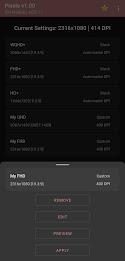
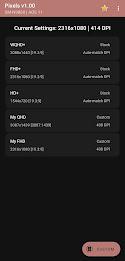
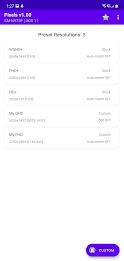
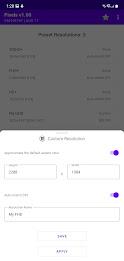
Pixels: Resolution+DPI Changer is a compact utility that lets you modify screen resolution and DPI settings on Android devices without rooting. Designed for power users and designers, it enables quick display tweaks to simulate different screen sizes, improve scaling, or test UI layouts for app development and personal preference.
Pixels: Resolution+DPI Changer focuses on practical display control. Instead of complex menus, it offers a direct path to change logical resolution and pixel density values. The app targets developers who need to preview layouts and regular users who want finer control over how apps and system interfaces scale on their device.
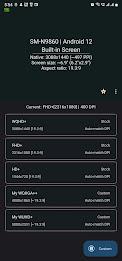
The feature set centers on straightforward yet powerful controls. Users can set custom resolution and DPI presets, preview changes before applying them, and restore defaults with a single action. The app supports multiple saved profiles so you can switch between configurations for games, productivity apps, or testing scenarios.
Under the hood, Pixels: Resolution+DPI Changer issues system-level display commands that alter the framebuffer and logical density values. The app leverages Android's built-in display configuration mechanisms, providing a safe interface to make temporary or persistent adjustments. No root access is required for many functions, though some advanced operations may need elevated permissions depending on the Android version.
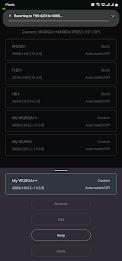
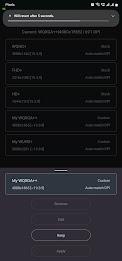
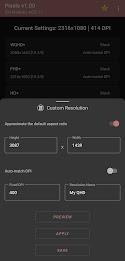
The interface prioritizes clarity. A simple input form lets you type or select common resolution and DPI combinations. After entering values, the preview window renders a mockup of the home screen and common UI elements so you can judge readability and spacing. Apply or revert actions are presented as clear buttons, minimizing accidental changes.
Beyond basic numeric fields, Pixels: Resolution+DPI Changer includes tools to refine results. You can set incremental steps for DPI adjustment, specify orientation-specific resolutions, and define whether changes affect system UI, apps only, or both. Color-coded indicators warn when values may impair legibility or exceed hardware capabilities.
Changing resolution and DPI can affect performance, and the app provides guidance to balance visuals and responsiveness. Lowering resolution can improve frame rates in graphics-heavy apps, while higher DPI makes text and icons crisper but may push GPU resources. Compatibility notes are included for popular manufacturers and Android releases to reduce trial-and-error.
Pixels: Resolution+DPI Changer is useful for several scenarios: app developers testing responsive layouts, designers previewing UI density, gamers optimizing performance, and everyday users who want larger on-screen text. The profile feature lets you switch settings automatically depending on the app currently in the foreground, streamlining workflow for mixed-use devices.
For quick setup, Pixels: Resolution+DPI Changer includes a guided first-run experience that saves a restore point and walks you through creating a profile. Frequent updates add device-specific improvements and tweak compatibility with the latest Android releases.
If you need precise control over how content is displayed, Pixels: Resolution+DPI Changer delivers focused functionality without unnecessary extras. It blends practical utility with a clean interface that makes display experiments predictable and reversible. Whether refining app interfaces or tuning your own device, the app puts display control in your hands while keeping safety and recoverability front and center.