
Pixel Studio is a powerful mobile pixel-art editor that blends intuitive touch controls with advanced features for both hobbyists and professionals. It offers layer support, animation tools, and export options to streamline pixel artwork creation on Android devices, making it easy to sketch, animate, and share sprites or icons.
Designed for creators who need a focused, lightweight environment, this app concentrates on the essentials of pixel art without overwhelming menus. The canvas feels responsive and the toolset covers both single-frame illustrations and multi-frame animations. Regular updates add refinement to workflow and compatibility with common graphics formats.
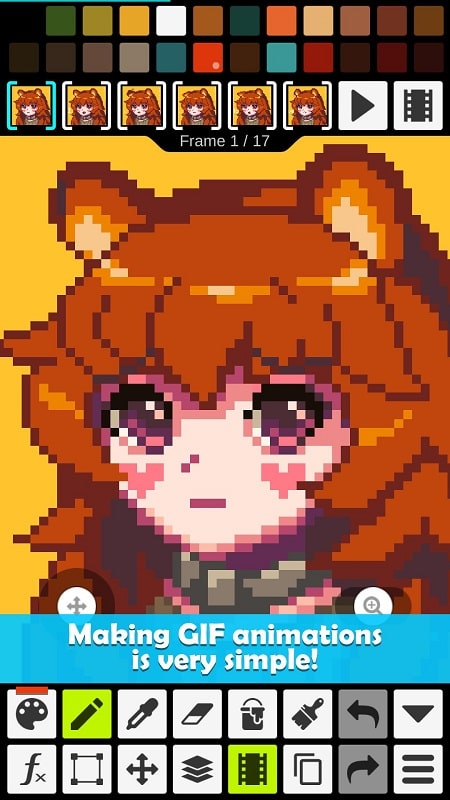
The app provides precise pixel-level tools built for accuracy. A pressure-sensitive pencil emulates classic pixel placement while a single-pixel eraser keeps shapes clean. Pixel Studio includes selection, transform and flip actions so you can reposition artwork easily. Built-in rulers, grids and customizable brush sizes speed up detailed edits.
Animating in this editor follows a straightforward frame-based approach. Add, duplicate or delete frames from the timeline and preview playback with adjustable speed. Onion skin previews help align motion between frames. For game developers, there are options to export frames as a consolidated sprite sheet. Many users find the timeline intuitive for short looped animations and simple character rigs. The animation tools in Pixel Studio keep the focus on timing and pixel-level accuracy.
Export flexibility is a strong point. Save single images as high-quality PNGs, export animated GIFs for quick previews, or generate sprite sheets for direct use in game engines. The app respects transparency and lets you choose canvas scaling to preserve crisp edges. Sharing is quick through Android’s native share panel, or save files directly to cloud folders for collaborative workflows.
Menus are compact and context-aware so common tools remain accessible without clutter. Performance is smooth on modern devices and remains usable on older phones thanks to optimized rendering. Touch gestures are implemented for zooming and panning, while an optional grid overlay gives you tight control over placement. Users report minimal lag even on larger canvases and multiple layers.
This editor is ideal for pixel artists, indie developers and designers creating UI icons or game sprites. It balances a shallow learning curve with enough depth for advanced projects. Schools and hobbyists appreciate the direct interface, while professionals value the precise controls and export capabilities.
Overall, Pixel Studio offers a compact but capable environment for pixel art creation. Whether you are sketching character sprites, animating a short loop, or designing retro-style graphics, the app provides the necessary tools to create, refine and export polished pixel work efficiently.