
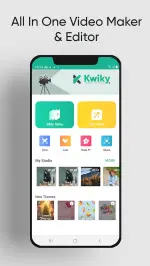
Kwiky is a lightweight productivity app designed to speed up everyday tasks with minimal setup. It provides fast shortcuts, a compact launcher, and automation tools to streamline routines across Android devices, letting users access apps, contacts, and actions with fewer taps and predictable performance.
Kwiky focuses on reducing friction between intent and action. Instead of navigating multiple screens or menus, it offers a single point to trigger apps, call contacts, open URLs, and run small automations. The goal is to shave seconds off repeated tasks so users can focus on what matters.
The interface is intentionally restrained: a small, responsive widget or gesture surface that expands into action cards. Animations are subtle to maintain speed, and the app prioritizes low memory and battery usage. On mid-range phones Kwiky runs smoothly, with near-instant response when invoking shortcuts.
Once installed, Kwiky prompts you to select your favorite apps and common actions. You can create custom tiles that sequence multiple steps. For example, a "Commute" tile can start a navigation route, launch your music app, and send a short ETA message. All sequences are executed in order with minimal delay.
The automation engine uses simple triggers: time ranges, location proximity, or explicit gestures. Rules are constructed through an intuitive editor, so non-technical users can chain actions without writing code. Rules can be toggled on or off, and you can test them before making them active.
Kwiky integrates with installed apps through Android's standard intents, so compatibility is broad without needing deep system access. It supports launching popular messaging, navigation, and media apps. The app is careful about permissions: most features work without granting access to contacts or SMS unless an action explicitly needs them.
Privacy is emphasized by limiting background data collection. Any suggestion or automation that uses personal information requests explicit consent. Logs of actions are local by default and can be cleared anytime.
Start with a few high-value shortcuts rather than automating every action. Identify the repetitive tasks you do daily—commuting, checking emails, or launching a study playlist—and map those into Kwiky first. Use context triggers sparingly to avoid unexpected behavior.
Installing Kwiky is straightforward: download from the store, allow the minimal run-time permissions it requests, and follow the setup wizard to pick initial apps and actions. The app includes short tutorials and sample tiles to help you build productive workflows quickly.
Kwiky excels at converting repetitive multi-step routines into single, reliable triggers. For users who value time and prefer a lean interface, it offers a practical way to streamline daily Android behavior without heavy configuration or privacy trade-offs.