

Users who want a fast, mobile workflow will find YouTube Create a handy editing companion for producing polished videos on the go. This app brings a simplified set of editing tools to your phone so you can stitch clips, add music and captions, and prepare uploads without switching to desktop software. Whether you publish quick updates, short tutorials or social clips, YouTube Create focuses on speed and clarity while still offering advanced touches like background removal and audio cleanup to lift the overall production value.
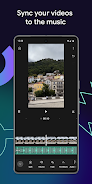
Importing media: Tap to add video clips, photos or audio from your device and arrange them on a simple timeline; the interface prioritizes drag-and-drop ordering.
Basic trims and edits: Slice, crop and adjust clip length with fingertip controls so you can cut out pauses and tighten pacing without a steep learning curve.
Export and publish: Pick an aspect ratio for the destination platform, render the file and upload directly to your channel or save a share-ready copy for other apps.
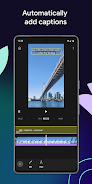
Captioning and subtitles: One-tap auto-captions speed up accessibility work and let you edit the text if timings or wording need refinement.
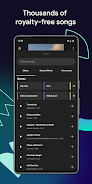
Royalty-free audio library: Browse tracks and sound effects included in the app, then sync clips to the beat or adjust levels for voice and music balance.
Background and audio tools: Use the cut out effect to isolate subjects from busy backgrounds and the audio cleanup tool to remove hums or background noise for clearer narration.
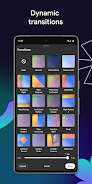
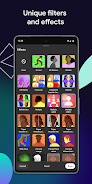
Visual polish: Apply customizable color filters, tweak saturation and exposure, and pick from a large set of transitions to give videos a cohesive look.
Text, stickers and motion: Add animated titles with different fonts, place stickers or GIF-style elements, and animate entries so thumbnails and intros feel more dynamic.
Flexible aspect ratios: Resize projects between portrait, landscape and square so the same source material can be used for different social platforms without re-editing.
Practical scenarios: Edit a short product demo between meetings to post later, or assemble a quick cooking tip video right after filming in the kitchen using a trimmed soundtrack and captions.
If you produce short-form videos and prefer handling most work on a phone, YouTube Create provides a compact set of tools that help you move from raw footage to published content quickly. It balances ease of use with a handful of professional features, and is worth trying if you want to shorten your editing loop and get more content out to an audience with less friction.